> ## Documentation Index
> Fetch the complete documentation index at: https://help.polygon-one.com/llms.txt
> Use this file to discover all available pages before exploring further.
# Targeted Update Requests
> Ask suppliers to update specific compliance areas
## Overview
With **targeted update requests**, you can ask suppliers to review and update specific areas of their compliance data — for example, only the geodata or only the legal questionnaire. This avoids unnecessary follow-up questions and accelerates the compliance process.
 ## Creating a Request
Open the **supply chain view** and click the supplier node you want. Select **"Request update"**.
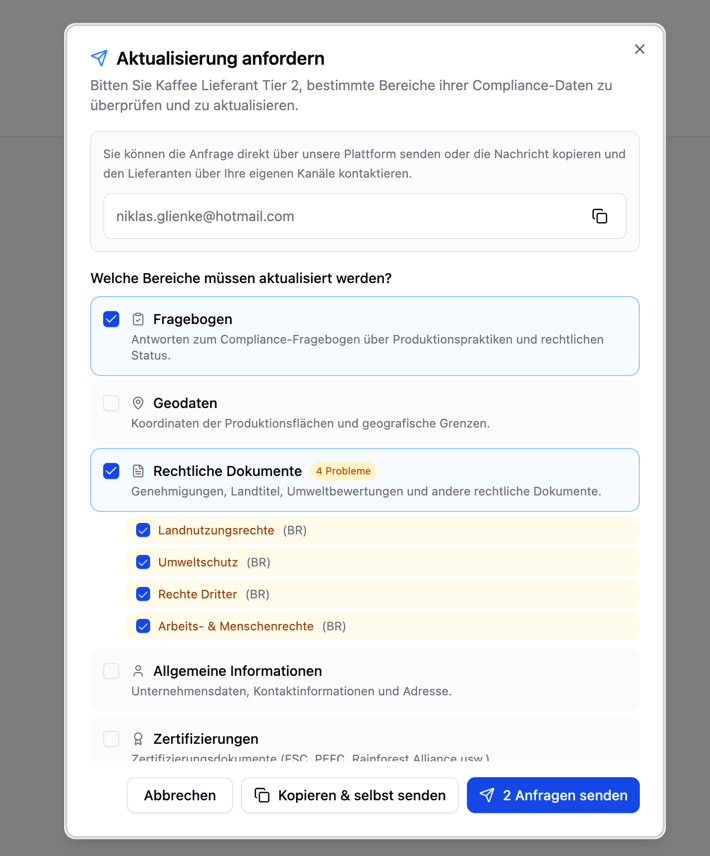
Select the areas you want the supplier to update:
| Area | Description |
| ----------------------- | ----------------------------------------------- |
| **Questionnaire** | Compliance questionnaire on legal categories |
| **Geodata** | Production area coordinates and boundaries |
| **Legal documents** | Permits, land titles, environmental assessments |
| **General information** | Company data, contact, address |
| **Certifications** | FSC, PEFC, Rainforest Alliance, ISCC, etc. |
Polygon One automatically pre-selects the areas that require attention based on the current compliance status (status: pending, non-compliant, or in review).
If relevant, you can additionally specify which **legal categories** are affected:
* Land use rights
* Environmental protection
* Forestry regulations
* Third-party rights
* Labor & human rights
* Taxes, trade & customs
* Anti-corruption
Add a personal message to give the supplier context.
Do **not** include any **compliance results or risk assessment details** in your message. The supplier sees the relevant areas directly in their portal.
Select the delivery method:
* **"Send request"** — The supplier is automatically notified by email (the button shows the number of selected requests, e.g. "Send 1 request")
* **"Copy & send yourself"** — The message and email address are copied to your clipboard so that you can send them through your own channel
## What the Supplier Sees
After receiving the request, the supplier opens their portal and sees the requested areas highlighted. They can update only the requested information in a targeted way, without having to go through the entire onboarding process again.
## Tracking
The progress of each update request is tracked through notifications:
| Status | Description |
| ------------- | --------------------------------------------------------- |
| **Sent** | The request has been submitted to the supplier |
| **Viewed** | The supplier has opened the requested areas in the portal |
| **Completed** | The supplier has updated the requested data |
These status changes also appear in your [notification center](/en/eudr/optional/benachrichtigungen).
Targeted update requests are especially useful after the [risk assessment](/en/eudr/datensammlung/risikoanalyse), when you know which specific areas need improvement.
## Creating a Request
Open the **supply chain view** and click the supplier node you want. Select **"Request update"**.
Select the areas you want the supplier to update:
| Area | Description |
| ----------------------- | ----------------------------------------------- |
| **Questionnaire** | Compliance questionnaire on legal categories |
| **Geodata** | Production area coordinates and boundaries |
| **Legal documents** | Permits, land titles, environmental assessments |
| **General information** | Company data, contact, address |
| **Certifications** | FSC, PEFC, Rainforest Alliance, ISCC, etc. |
Polygon One automatically pre-selects the areas that require attention based on the current compliance status (status: pending, non-compliant, or in review).
If relevant, you can additionally specify which **legal categories** are affected:
* Land use rights
* Environmental protection
* Forestry regulations
* Third-party rights
* Labor & human rights
* Taxes, trade & customs
* Anti-corruption
Add a personal message to give the supplier context.
Do **not** include any **compliance results or risk assessment details** in your message. The supplier sees the relevant areas directly in their portal.
Select the delivery method:
* **"Send request"** — The supplier is automatically notified by email (the button shows the number of selected requests, e.g. "Send 1 request")
* **"Copy & send yourself"** — The message and email address are copied to your clipboard so that you can send them through your own channel
## What the Supplier Sees
After receiving the request, the supplier opens their portal and sees the requested areas highlighted. They can update only the requested information in a targeted way, without having to go through the entire onboarding process again.
## Tracking
The progress of each update request is tracked through notifications:
| Status | Description |
| ------------- | --------------------------------------------------------- |
| **Sent** | The request has been submitted to the supplier |
| **Viewed** | The supplier has opened the requested areas in the portal |
| **Completed** | The supplier has updated the requested data |
These status changes also appear in your [notification center](/en/eudr/optional/benachrichtigungen).
Targeted update requests are especially useful after the [risk assessment](/en/eudr/datensammlung/risikoanalyse), when you know which specific areas need improvement.