> ## Documentation Index
> Fetch the complete documentation index at: https://help.polygon-one.com/llms.txt
> Use this file to discover all available pages before exploring further.
# Outbound DDS
> Due Diligence Statements for outbound orders and domestic production
## Overview
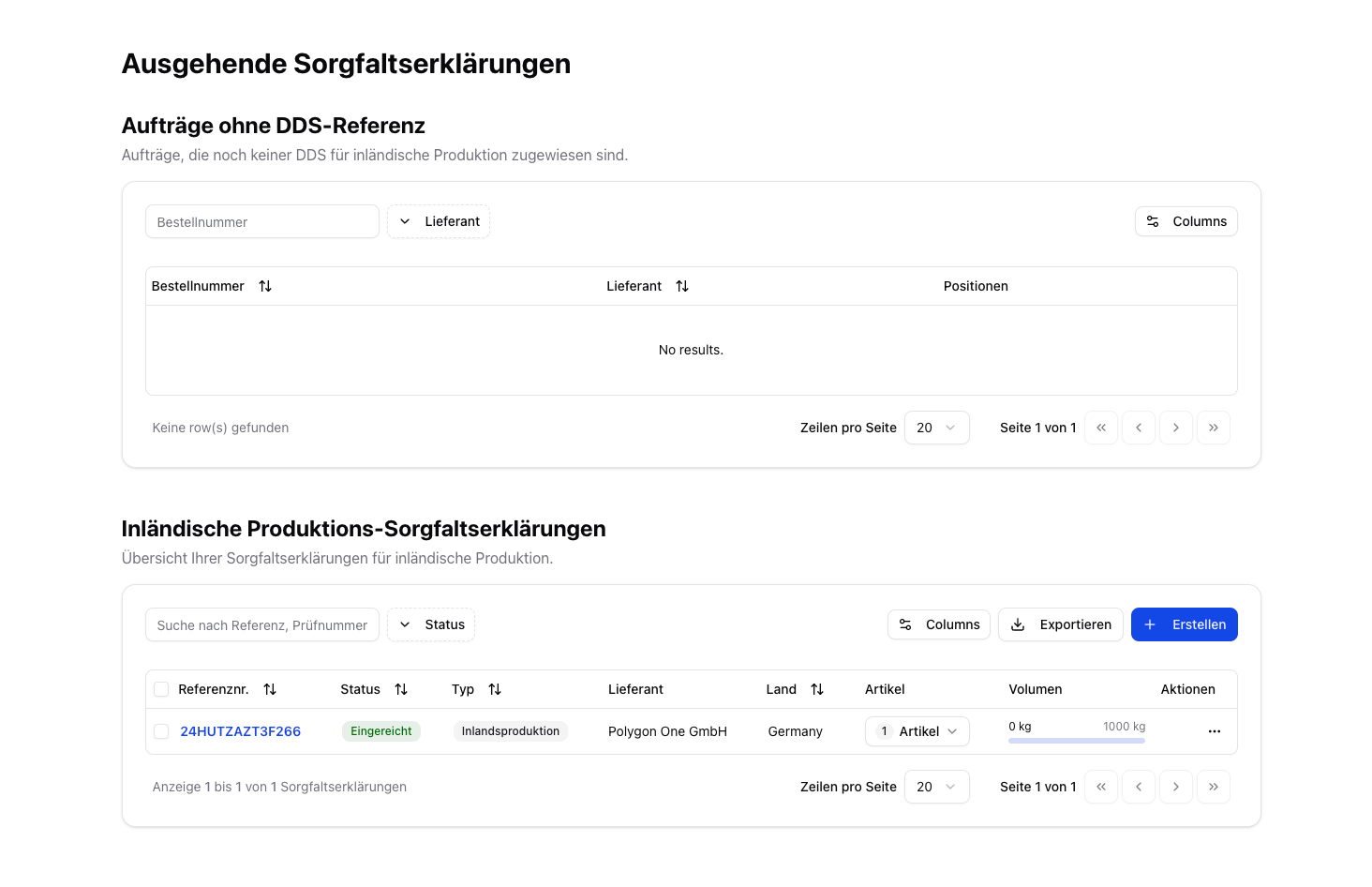
The **DDS → Outbound** page manages Due Diligence Statements for outbound goods. This primarily concerns **domestic production** within the EU as well as sales orders that are covered through traceability, BOM linking, and existing evidence.
The page displays two sections:
1. **Orders without a DDS reference** — Sales orders that are not yet assigned to a DDS
2. **Domestic production Due Diligence Statements** — Overview of the DDS created for your own production
 ## DDS for Domestic Production
With **domestic production**, you are the producer yourself. Sales orders automatically use your own company as the supplier in this case.
### Create a DDS
Create a new DDS by clicking **Create**. The activity type is then automatically set to **Domestic Production**.
Select your sales articles and enter the produced quantities in kg.
Confirm the due diligence, sign with your full name, and submit the DDS.
### Assigning a DDS to Orders
1. Navigate to the orders without a DDS reference.
2. Click **"Assign DDS"** and select the matching DDS.
3. The system shows only DDS with matching articles and sufficient remaining volume.
## Related Features on the Outbound Dashboard
The **EU production information** ("I produce this") and the **linking of input articles (bill of materials / BOM)** are not located on this DDS page, but on the separate **Outbound dashboard** (menu item **Outbound** under *Compliance*):
* **I produce this** — store the production country and production area (draw on the map or upload GeoJSON) and create a DDS for domestic production directly.
* **Link Inputs** — link purchase articles as the input of a sales article; linked DDS (including external DDS) are automatically taken into account for outbound traceability.
For the full guide to these features, see [Outbound Articles & Traceability](/en/eudr/optional/outbound-artikel).
## DDS for Domestic Production
With **domestic production**, you are the producer yourself. Sales orders automatically use your own company as the supplier in this case.
### Create a DDS
Create a new DDS by clicking **Create**. The activity type is then automatically set to **Domestic Production**.
Select your sales articles and enter the produced quantities in kg.
Confirm the due diligence, sign with your full name, and submit the DDS.
### Assigning a DDS to Orders
1. Navigate to the orders without a DDS reference.
2. Click **"Assign DDS"** and select the matching DDS.
3. The system shows only DDS with matching articles and sufficient remaining volume.
## Related Features on the Outbound Dashboard
The **EU production information** ("I produce this") and the **linking of input articles (bill of materials / BOM)** are not located on this DDS page, but on the separate **Outbound dashboard** (menu item **Outbound** under *Compliance*):
* **I produce this** — store the production country and production area (draw on the map or upload GeoJSON) and create a DDS for domestic production directly.
* **Link Inputs** — link purchase articles as the input of a sales article; linked DDS (including external DDS) are automatically taken into account for outbound traceability.
For the full guide to these features, see [Outbound Articles & Traceability](/en/eudr/optional/outbound-artikel).