> ## Documentation Index
> Fetch the complete documentation index at: https://help.polygon-one.com/llms.txt
> Use this file to discover all available pages before exploring further.
# Packaging units
> Create and edit packaging units, fields and bill of materials
## Overview
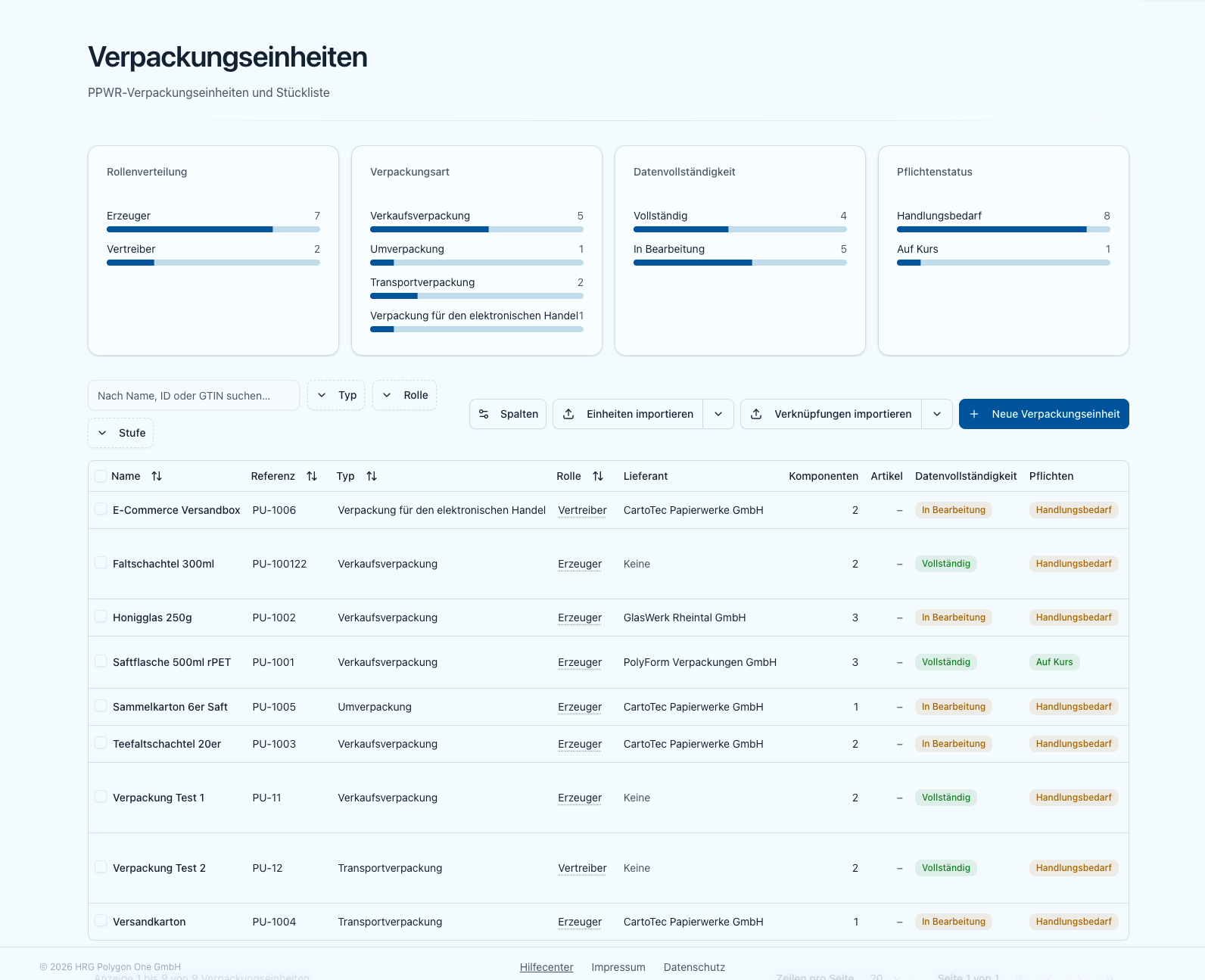
The **packaging unit** is the subject of the Declaration of Conformity. On the **Packaging units** page (sidebar → **Packaging units**, `/packaging`) you see four distribution tiles at the top (role distribution, packaging type, data completeness, obligation status) and below them the searchable, filterable table of your units.
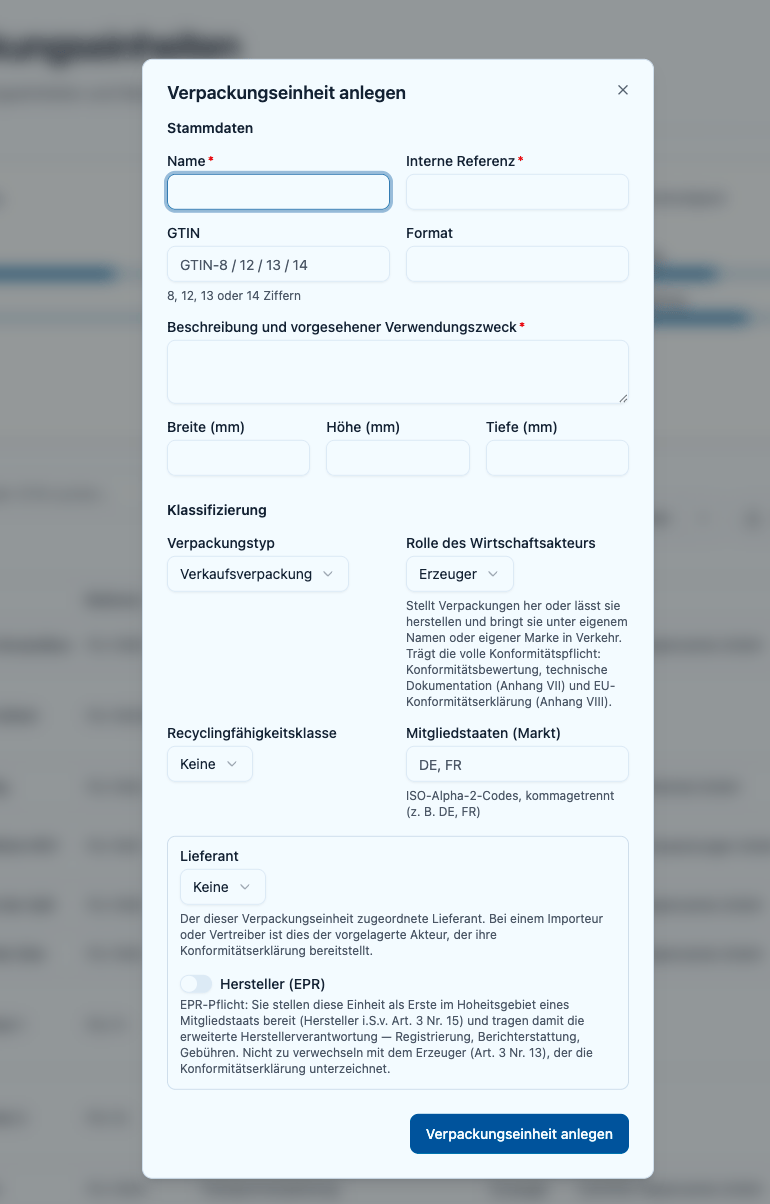
 You create a new unit via **New packaging**. This opens the create dialog with the same form used for editing.
## The form
The form has two sections: **Master data** and **Classification**.
### "Master data" section
| Field | Note |
| -------------------------------- | --------------------------------------------------------------------------------------------------------------------------------------------- |
| **Name** | Required. |
| **Internal reference** | **Optional when creating**, **required when editing**. Always **unique** among your active units. Also used as the key for the upsert import. |
| **GTIN** | Optional. 8, 12, 13 or 14 digits. |
| **Format** | Optional, free text. |
| **Description and intended use** | Required in the form. |
| **Width / Height / Depth (mm)** | Optional dimensions. |
**You can leave the internal reference blank when creating a unit.** Polygon One then assigns the next free reference for your company automatically — `PU-1`, `PU-2`, `PU-3` and so on. References you enter yourself are never changed or renamed. This applies to every way a unit comes into being: this form, the dialogs that create units from an article or component selection, the [CSV/Excel import](/en/ppwr/stammdaten/import#leaving-the-reference-blank) and the API.
When **editing** an existing unit the reference stays required — it cannot be blanked afterwards.
### "Classification" section
| Field | Note |
| -------------------------- | -------------------------------------------------------------------------------------------------------------------------------------------------------------------------------------------------------------------------------------- |
| **Packaging type** | Sales, grouped, transport, e-commerce or service packaging. |
| **Economic-operator role** | Manufacturer, importer, distributor, authorised representative, supplier or fulfilment service provider. A help text below the field explains each role. The role drives the obligations and who issues the Declaration of Conformity. |
| **Recyclability grade** | Optional: A, B, C or "Non-recyclable (\<70%)". |
| **Market member states** | Target markets as ISO alpha-2 codes, comma-separated (e.g. `DE, FR`). |
The **recyclability grade** is a **declared** value. The EU assessment methodology under Art. 6 only arrives via delegated acts (expected 2028). Polygon One does **not** assess recyclability automatically — it only stores the grade you enter.
### Supplier, producer (EPR) and Art. 21
A bordered box at the end of the section contains:
* **Supplier** — the operator assigned to this unit. For an importer or authorised representative this upstream operator provides the Declaration of Conformity; for a distributor it is the upstream operator whose producer registration and marking are checked (and who may provide the declaration voluntarily on request).
* **Producer (EPR)** — a switch (only for manufacturer, importer, distributor). It marks that you are the first to place this unit on the market in a Member State's territory (producer within the meaning of Art. 3(15)) and therefore carry extended producer responsibility — registration, reporting, fees. This is **not** the same role as the manufacturer who signs the Declaration of Conformity.
* **Art. 21 switches** (only for importer/distributor): **Placed under own brand** and **Modified affecting conformity**. If either applies, you assume the manufacturer's obligations — you then issue the Declaration of Conformity yourself.
You create a new unit via **New packaging**. This opens the create dialog with the same form used for editing.
## The form
The form has two sections: **Master data** and **Classification**.
### "Master data" section
| Field | Note |
| -------------------------------- | --------------------------------------------------------------------------------------------------------------------------------------------- |
| **Name** | Required. |
| **Internal reference** | **Optional when creating**, **required when editing**. Always **unique** among your active units. Also used as the key for the upsert import. |
| **GTIN** | Optional. 8, 12, 13 or 14 digits. |
| **Format** | Optional, free text. |
| **Description and intended use** | Required in the form. |
| **Width / Height / Depth (mm)** | Optional dimensions. |
**You can leave the internal reference blank when creating a unit.** Polygon One then assigns the next free reference for your company automatically — `PU-1`, `PU-2`, `PU-3` and so on. References you enter yourself are never changed or renamed. This applies to every way a unit comes into being: this form, the dialogs that create units from an article or component selection, the [CSV/Excel import](/en/ppwr/stammdaten/import#leaving-the-reference-blank) and the API.
When **editing** an existing unit the reference stays required — it cannot be blanked afterwards.
### "Classification" section
| Field | Note |
| -------------------------- | -------------------------------------------------------------------------------------------------------------------------------------------------------------------------------------------------------------------------------------- |
| **Packaging type** | Sales, grouped, transport, e-commerce or service packaging. |
| **Economic-operator role** | Manufacturer, importer, distributor, authorised representative, supplier or fulfilment service provider. A help text below the field explains each role. The role drives the obligations and who issues the Declaration of Conformity. |
| **Recyclability grade** | Optional: A, B, C or "Non-recyclable (\<70%)". |
| **Market member states** | Target markets as ISO alpha-2 codes, comma-separated (e.g. `DE, FR`). |
The **recyclability grade** is a **declared** value. The EU assessment methodology under Art. 6 only arrives via delegated acts (expected 2028). Polygon One does **not** assess recyclability automatically — it only stores the grade you enter.
### Supplier, producer (EPR) and Art. 21
A bordered box at the end of the section contains:
* **Supplier** — the operator assigned to this unit. For an importer or authorised representative this upstream operator provides the Declaration of Conformity; for a distributor it is the upstream operator whose producer registration and marking are checked (and who may provide the declaration voluntarily on request).
* **Producer (EPR)** — a switch (only for manufacturer, importer, distributor). It marks that you are the first to place this unit on the market in a Member State's territory (producer within the meaning of Art. 3(15)) and therefore carry extended producer responsibility — registration, reporting, fees. This is **not** the same role as the manufacturer who signs the Declaration of Conformity.
* **Art. 21 switches** (only for importer/distributor): **Placed under own brand** and **Modified affecting conformity**. If either applies, you assume the manufacturer's obligations — you then issue the Declaration of Conformity yourself.
 ## The detail page
After creating, the detail page opens with five tabs:
* **Overview** — the packaging data (the same form) for editing.
* **Components** — this unit's bill of materials (count in brackets).
* **Obligations** — which PPWR obligations apply to this unit and their status.
* **Documents** — Declaration of Conformity, technical documentation and attached evidence.
* **Articles** — the articles linked to this unit.
Top right are the actions **Upload evidence** and **Request data** (supplier request), plus — if present — a chip with open AI proposals.
## Managing components (bill of materials)
In the **Components (bill of materials)** tab you build the composition of the unit:
Under **Link existing component**, choose a component, enter the **quantity** and click **Link**.
Via **New component** you open the component form; the new component is linked directly to this unit.
Adjust the **quantity** per row directly. Use the trash icon to unlink a component from the unit.
Expand a row to edit the component's data inline. The **Data completeness** badge per row shows what is still missing.
## The detail page
After creating, the detail page opens with five tabs:
* **Overview** — the packaging data (the same form) for editing.
* **Components** — this unit's bill of materials (count in brackets).
* **Obligations** — which PPWR obligations apply to this unit and their status.
* **Documents** — Declaration of Conformity, technical documentation and attached evidence.
* **Articles** — the articles linked to this unit.
Top right are the actions **Upload evidence** and **Request data** (supplier request), plus — if present — a chip with open AI proposals.
## Managing components (bill of materials)
In the **Components (bill of materials)** tab you build the composition of the unit:
Under **Link existing component**, choose a component, enter the **quantity** and click **Link**.
Via **New component** you open the component form; the new component is linked directly to this unit.
Adjust the **quantity** per row directly. Use the trash icon to unlink a component from the unit.
Expand a row to edit the component's data inline. The **Data completeness** badge per row shows what is still missing.
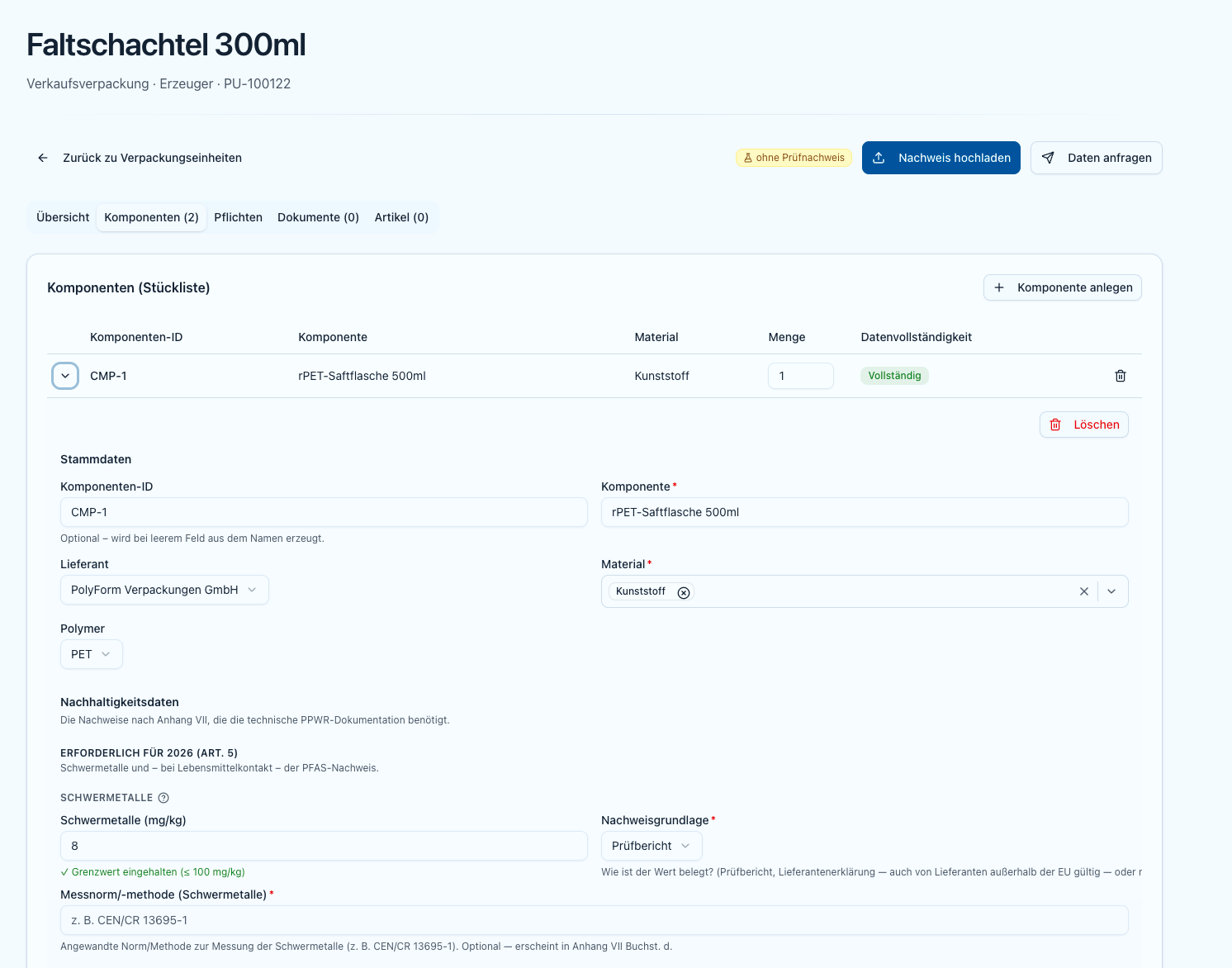 Details on the component fields (heavy metals, PFAS, recycled content) are in [Components](/en/ppwr/stammdaten/komponenten).
## Unit obligations
The **Obligations** tab shows, per packaging unit, the applicable PPWR obligations and their status. Obligations that only enter into force in 2028/2030 are marked as "not yet in force" and are never flagged as outstanding. How these obligations derive from the role is described in the [obligations catalogue](/en/ppwr/rollen-pflichten/pflichtenkatalog).
Once a unit is ready, issue the declaration in the "Documents" tab.
Details on the component fields (heavy metals, PFAS, recycled content) are in [Components](/en/ppwr/stammdaten/komponenten).
## Unit obligations
The **Obligations** tab shows, per packaging unit, the applicable PPWR obligations and their status. Obligations that only enter into force in 2028/2030 are marked as "not yet in force" and are never flagged as outstanding. How these obligations derive from the role is described in the [obligations catalogue](/en/ppwr/rollen-pflichten/pflichtenkatalog).
Once a unit is ready, issue the declaration in the "Documents" tab.