

Overview
When the PPWR module is active, you land on the same Dashboard page (/dashboard) after login as in the EUDR module — it is then headed PPWR tasks (“Packaging conformity at a glance”). It condenses the state of your entire packaging portfolio into one concrete next action and a prioritized task list — you don’t have to review every packaging unit yourself.
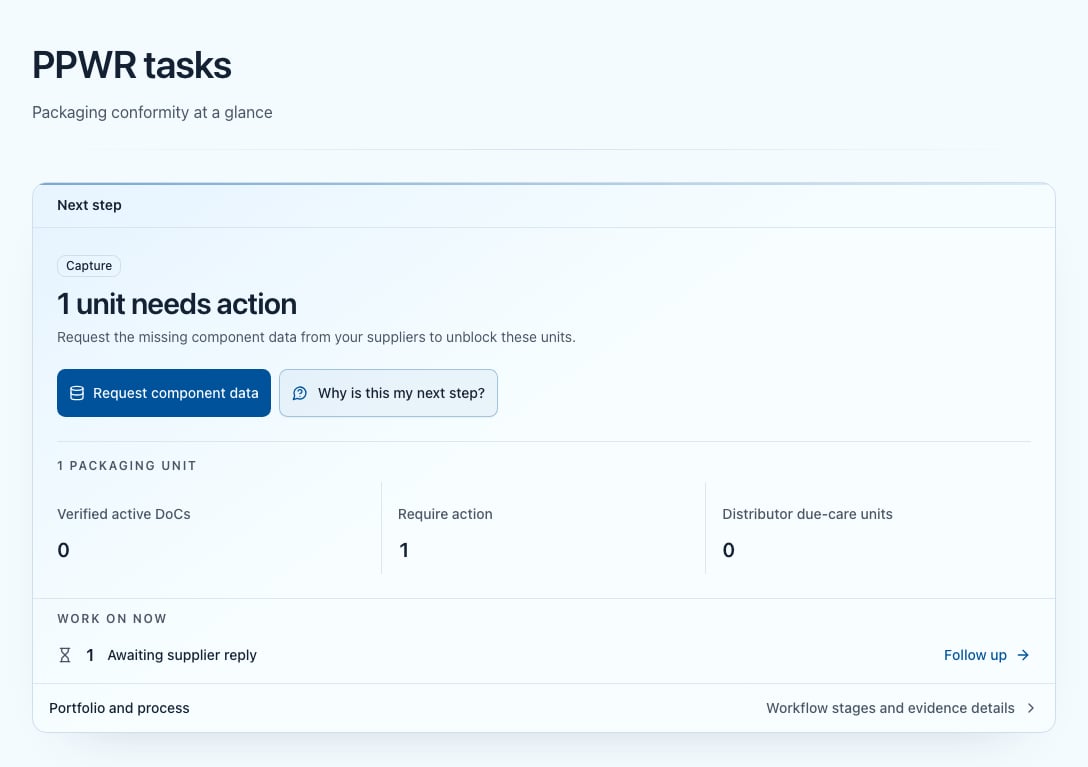
The PPWR dashboard with the main action and the task list — the phase rail and the compliance funnel sit below it in the collapsible Portfolio and process section
What you see on the dashboard
Main action
At the top, under the heading “Next step”, the dashboard shows the currently most important action. Priority follows a “pull from the right” principle: whatever is closest to a finished Declaration of Conformity wins — declarations in verification first, then issuable ones, then ones to collect, then open proposals, and finally missing component data. Depending on your portfolio the button therefore reads, for example, Review declarations in verification, Issue Declarations of Conformity, Collect Declarations of Conformity, Review proposals or Request component data. While articles and units are still missing, the main action reads Import packaging data — with Onboard suppliers beside it. With articles but no units it reads Import packaging units. Once everything is covered, the page reports “All packaging units are covered” and carries the All clear badge. As soon as at least one unit exists, a separate block below the main action shows the total number of your packaging units and, under it, three figures: Verified active DoCs, Require action and Distributor due-care units. The first and the third are clickable and open the correspondingly filtered list.If the portfolio is fully covered and a regulatory task is due at the same time, that task takes the place of the main action: the card then carries the Regulatory tasks badge and leads with Open into EPR registration or volume reporting.
Re-use documentation
If you keep units flagged as reusable whose system documentation is not yet in place, the block “Complete re-use documentation” (“Work through documentation gaps by status.”) appears above the task list, with two filters: Without a system (…) and Evidence incomplete (…). Details under re-use systems.Task list
The “Work on now” section lists the remaining open tasks with a count and a matching action — a task already shown above as the main action is not repeated here:
EPR registration and Volume report only appear when you keep units marked as producer (EPR). In any case only tasks that actually have something to do are shown; the first three of this list are listed openly, all the rest behind “Show … more tasks”. Each row leads straight into the correspondingly filtered list, where the matching bulk action is available.
Declarations of Conformity out of date always comes last and only appears when such units exist. It is not a step backwards: those units hold a declaration whose underlying data has changed since — see Declaration of Conformity.
Phase rail
The phase rail sits in the collapsible Portfolio and process section (“Workflow stages and evidence details”) at the foot of the page. It has four stages:- Master data — articles & units
- Capture — component data present
- Review — open AI proposals reviewed
- Declaration — declaration issued
done/total units), while Master data shows the hint Articles & units instead; each also carries its status (Done, In progress or Upcoming). If a phase contains open units, it is clickable and opens the packaging-units list filtered to that stage.
Units on the collect track (importer/authorised representative) run in parallel and do not count in the denominator of the generate pipeline — the phase rail measures the manufacturer’s path (capture → review → issue). Distributor units without a Declaration of Conformity land in the neutral Due care stage (no duty under Art. 19, only optional actions) and likewise do not count in the pipeline.
Compliance funnel
Directly below the phase rail — also inside Portfolio and process — the compliance funnel partitions your portfolio into seven stages under the heading “Compliance funnel”, with the total beside it (”… units total”). Every tile is clickable and opens the list filtered exactly that way.
The compliance funnel inside the collapsible Portfolio and process section — seven stages for included packaging units, including distributors with due-care-only status
The funnel covers the operationally included packaging units. This includes distributor units in the neutral Due care stage even though they do not have to collect a Declaration of Conformity; supplier and fulfilment units are excluded. When applicable, the note ”… of them have no test report” appears below it — conform units evidenced only by a supplier declaration. The note is purely informational.
Recommended way of working
1
Start with the main action
It reflects the biggest lever — the units that are closest to a Declaration of Conformity.
2
Work through the task list
Process the prioritized tasks in order; each opens the matching filtered list with its bulk action.
3
Use the funnel to diagnose
If a stage is unexpectedly high, open the tile and inspect the affected units.
Build master data
How articles, packaging units and components relate.