

Why data collection?
The PPWR demands evidence about things you usually do not know yourself: material composition, heavy-metal and PFAS values, recycled content, weights. That data sits with whoever actually makes the packaging — your supplier. Without their input you can complete neither the technical documentation (Annex VII) nor the EU Declaration of Conformity (Annex VIII). This is exactly why Art. 16 PPWR obliges the supplier to provide the manufacturer with all information and evidence needed to demonstrate conformity. Polygon One turns this exchange into a structured workflow: you send a request, the supplier delivers directly into the platform, and the data lands on the right packaging unit without retyping.Data collection closes the open items from the obligation checklist: every delivered component and every delivered document directly feeds the status of your units.
The two collection grains
Packaging data is collected on one of two grains:1. Supplier on the packaging unit (recommended default)
You assign a supplier to a whole packaging unit and request the data for the unit. The supplier drops the documentation they already have — technical documentation, a supplier declaration, a declaration of conformity, or test reports — and adds the component data in the portal. The two belong together: a document substantiates the entries, it does not replace them. This is the primary way of working: you do not need to know the packaging’s bill of materials yourself; the supplier builds it for you.2. Supplier on the individual component
If you have already created a unit’s components yourself, you can assign a supplier to individual components and request the data for exactly that component (e.g. only the heavy-metals test report for the lid). The supplier then fills in the values of the existing component instead of creating new ones.A single request stays on one grain — but the request dialog lets you select both at once: a mixed selection creates one request per grain, and with the “Copy link” delivery method the supplier still receives one combined link. You assign the supplier directly in the request dialog, in the packaging unit’s form, or in the supplier dialog.
The collection cockpit: Suppliers
The Suppliers menu item (/packaging/suppliers) is your control cockpit for the entire collection: “Track which suppliers have been asked for packaging data, who has replied, and what’s blocking.”
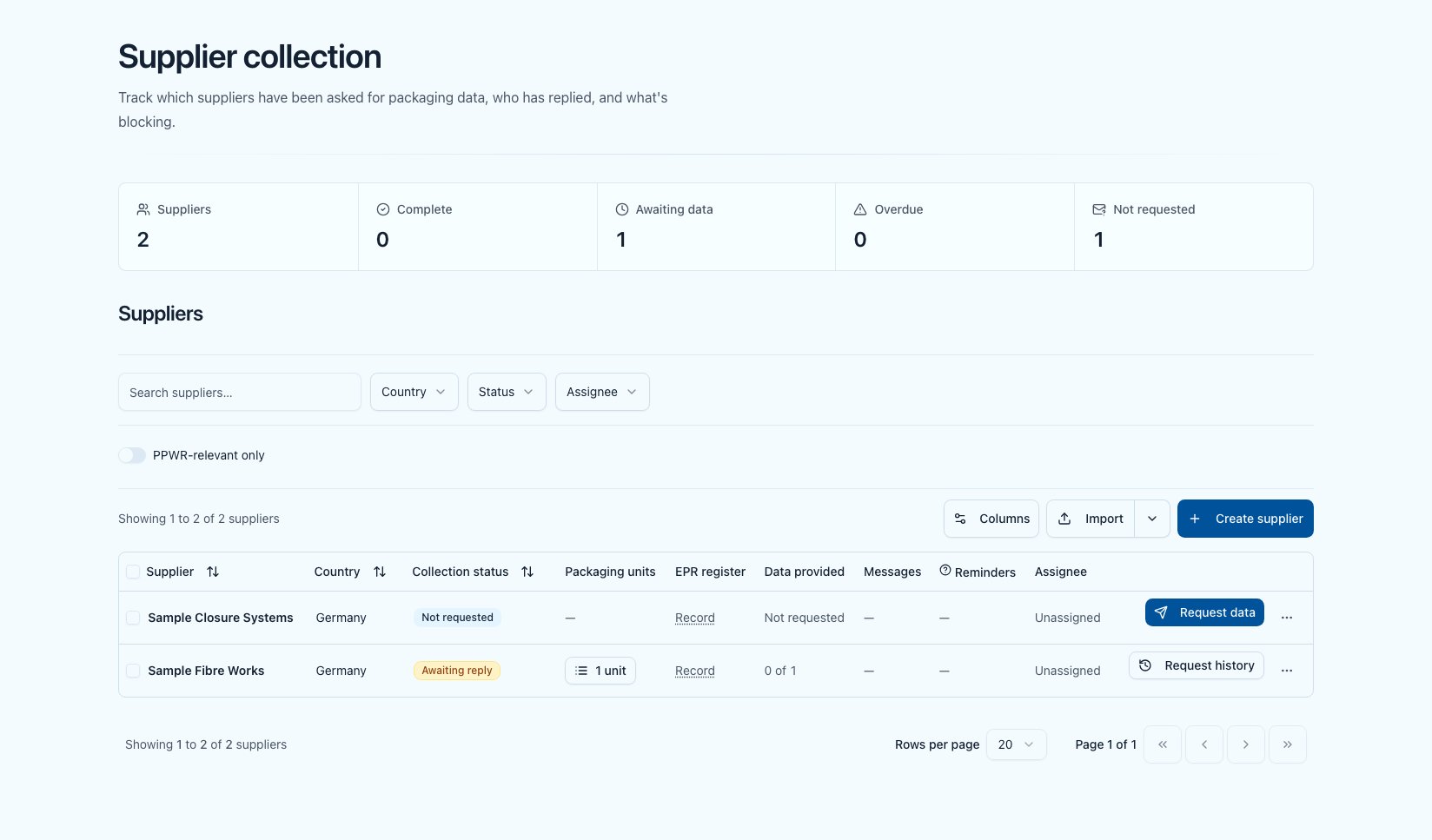
Supplier collection — the cockpit for PPWR data collection
You filter via search, Country, Collection status, and Assignee, plus the two toggles PPWR-relevant only and Assigned to me.
From every row you launch the key actions: Request data, Request history, Request correction (only once data has been provided), Assign to, and Delete supplier. Multi-select — including the cross-page Select all {count} suppliers — lets you ask many suppliers at once via Request data ({count}).
By default the cockpit shows all of your company’s suppliers. The PPWR-relevant only filter narrows the list to suppliers with assigned packaging units or components.
The Request data row action opens the request dialog with the scope pre-selected — you send deliberately and can narrow it first. The bulk action, by contrast, sends automatically and by email only; suppliers without an email address are skipped. Details: Data requests.
The flow at a glance
Two steps in this flow — reading the supplier’s dropped documents automatically, and reviewing the values that were read on your side — depend on AI document analysis.AI document analysis is an add-on. The steps described here are available once it is enabled for your workspace. Without it, you enter the values manually as before.
1
Assign the supplier
Assign the responsible supplier to the packaging unit (or to individual components) — directly in the request dialog or in the unit’s form.
2
Send a data request
Create a data request — as an email from the platform or as a copyable link.
3
The supplier delivers
The supplier drops their documents, adds the component data, and can delegate items to their sub-supplier — all in the supplier portal, with no account required. All three routes are open on every item at once.
4
Track progress and follow up
The cockpit shows who has delivered and what’s blocking. Automatic reminders chase late suppliers.
5
Review evidence
The AI reads uploaded documents and puts the values it found, each with its source passage, in front of you to decide — details under Evidence documents.
Further pages
Data requests
Create, send, chase requests and review replies.
Supplier portal
What your supplier sees and does after receiving the request.
Evidence documents
Uploading documents, AI analysis, the document library.
Obligation checklist
Where the collected data feeds in.