

Overview
With targeted update requests, you can ask suppliers to review and update specific areas of their compliance data — for example, only the geodata or only the legal questionnaire. This avoids unnecessary follow-up questions and accelerates the compliance process.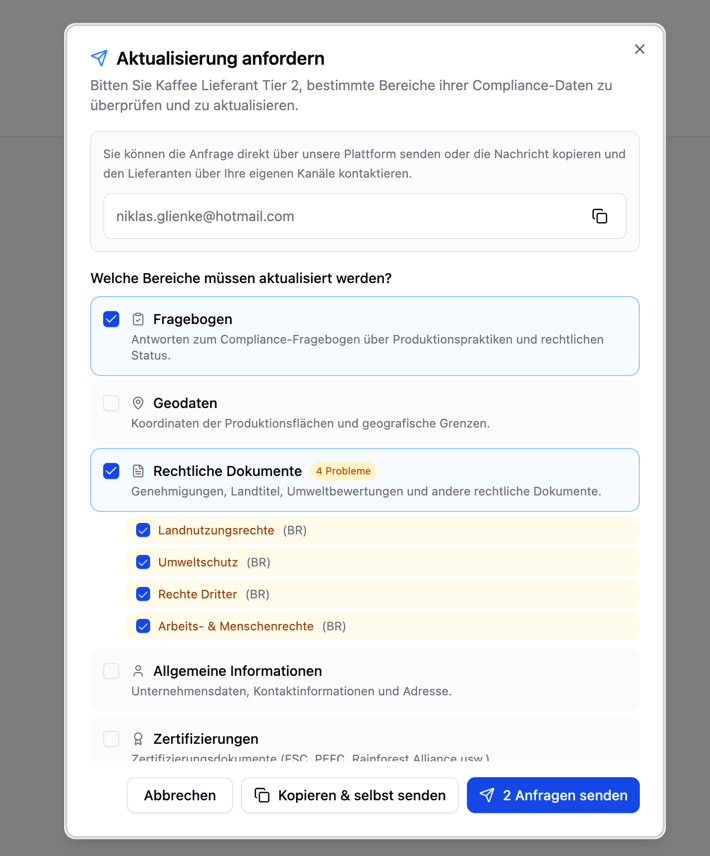
Creating a Request
Select a supplier
Open the supply chain view and click the supplier node you want. Select “Request update”.
Select the areas
Select the areas you want the supplier to update:
| Area | Description |
|---|---|
| Questionnaire | Compliance questionnaire on legal categories |
| Geodata | Production area coordinates and boundaries |
| Legal documents | Permits, land titles, environmental assessments |
| General information | Company data, contact, address |
| Certifications | FSC, PEFC, Rainforest Alliance, ISCC, etc. |
Polygon One automatically pre-selects the areas that require attention based on the current compliance status (status: pending, non-compliant, or in review).
Specify legal categories (optional)
If relevant, you can additionally specify which legal categories are affected:
- Land use rights
- Environmental protection
- Forestry regulations
- Third-party rights
- Labor & human rights
- Taxes, trade & customs
- Anti-corruption
Send
Select the delivery method:
- “Send request” — The supplier is automatically notified by email (the button shows the number of selected requests, e.g. “Send 1 request”)
- “Copy & send yourself” — The message and email address are copied to your clipboard so that you can send them through your own channel
What the Supplier Sees
After receiving the request, the supplier opens their portal and sees the requested areas highlighted. They can update only the requested information in a targeted way, without having to go through the entire onboarding process again.Tracking
The progress of each update request is tracked through notifications:| Status | Description |
|---|---|
| Sent | The request has been submitted to the supplier |
| Viewed | The supplier has opened the requested areas in the portal |
| Completed | The supplier has updated the requested data |