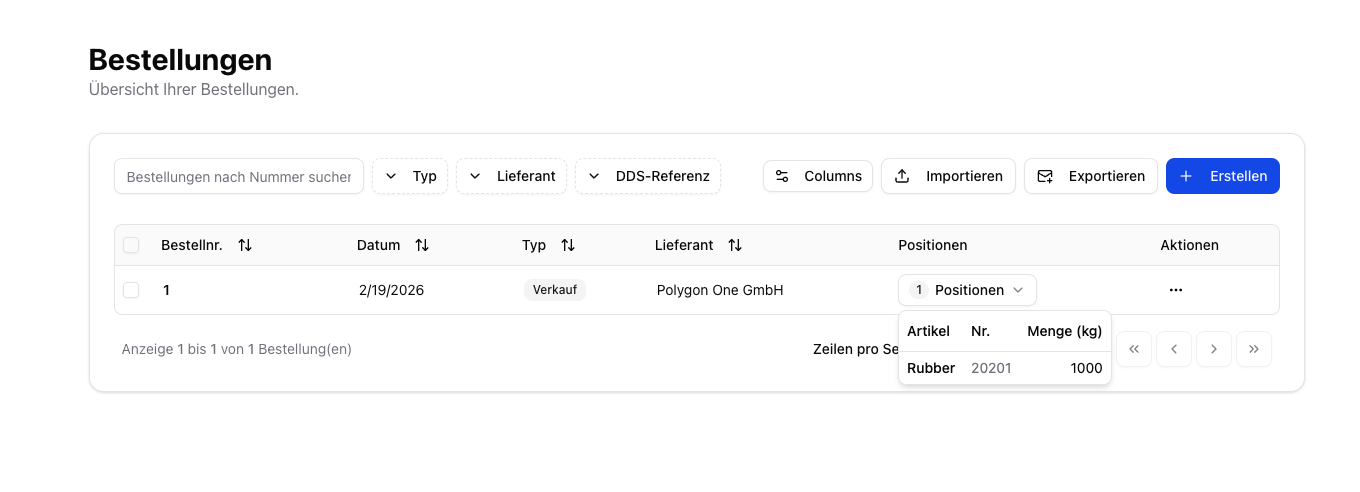
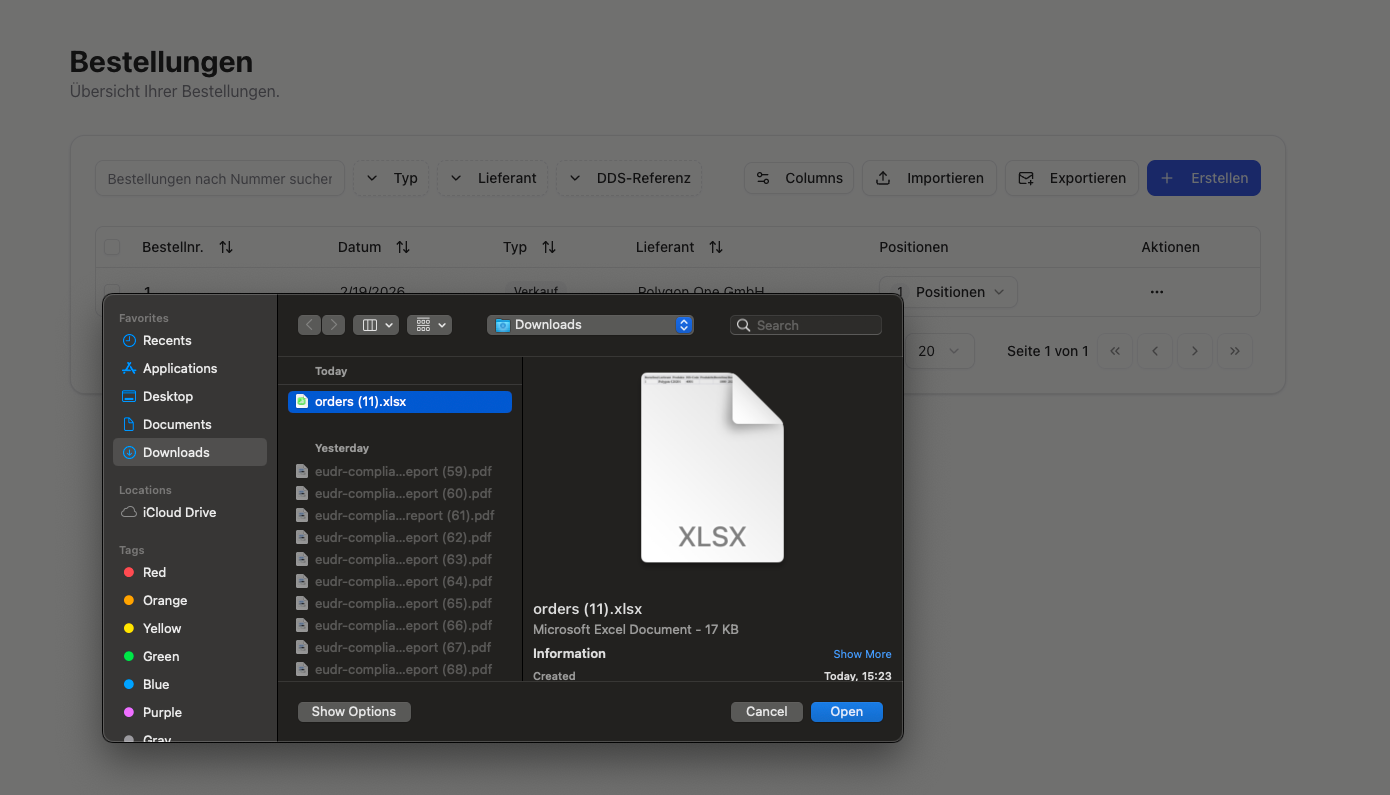
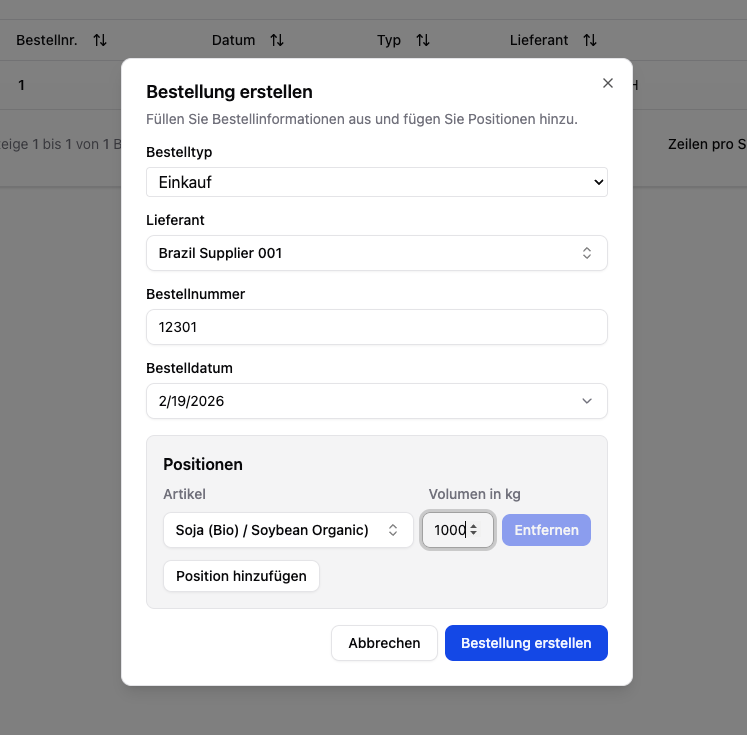
To link compliance results to actual shipments, you must import your orders into Polygon One. Each order captures the supplier, the articles, and the quantities.
The Excel template (.xlsx) is the recommended download. It contains a second sheet, “Guide”, listing each column’s requirement, description and accepted values. The CSV template is the plain alternative without that sheet. In coded columns the code (e.g. purchase) always works — the import additionally accepts the label as Polygon One displays it in your interface language (Purchase, Einkauf on a German login).
The columns in template order. Conditional means: required as soon as the condition in the description applies.
Field
Required
Description
Order Number
Yes
Unique order number
Order Date
No
Date of the order — as DD.MM.YYYY or YYYY-MM-DD
Delivery Date
No
Delivery date (expected or actual) of the position — as DD.MM.YYYY or YYYY-MM-DD. Rows of one order may carry different dates (split delivery); the order shows the earliest
Order Type
Yes
purchase (incoming goods) or sale (outgoing goods)
Supplier
Conditional
Supplier name — required for purchase orders
Supplier External ID
No
Takes precedence over the supplier name during matching
Supplier E-Mail
No
Supplements automatically created suppliers
Supplier Country
No
Supplements automatically created suppliers — English country name (e.g. Germany) or ISO code (DE)
Supplier Address
No
Supplements automatically created suppliers
Article Number
Yes
Internal article number
Quantity
Conditional
Order quantity in kg — optional if a piece count is provided
Piece Count
Conditional
Alternative to quantity — converted to kg via the “Weight per Piece (kg)” stored on the article
Volume (m³)
No
Supplementary EUDR DDS unit (MTQ) for wood-panel HS codes
Dry Weight 90% (kg)
No
Supplementary EUDR DDS unit (KSD) for wood-pulp HS codes — kilograms of 90 % dry substance
HS Code
Conditional
Required to create an article if the article does not yet exist
DDS Reference Number
No
External DDS reference (for passing through upstream DDS)
DDS Verification Number
No
External DDS verification number
Dates in two spellings only. The import reads DD.MM.YYYY (always day first, also with a trailing clock time as ERP exports write it) and YYYY-MM-DD. Two-digit years follow Excel’s own window: 00–29 as 2000s, 30–99 as 1900s.Slashed dates are refused, not guessed — 03/01/2026 can be 3 January or 1 March. The row reports “Invalid date — accepted: DD.MM.YYYY or YYYY-MM-DD” and is not imported; the rest of the file still goes through. Convert the date columns in your export before uploading.
During order import, suppliers and articles can be created automatically if they do not yet exist. The system matches by name or external ID.The HS code and article description columns are only used for such new articles. An existing article is never changed by an order import — to update its HS code, edit the article or use the article import.
Under Settings → CSV Imports → Orders, you can permanently map your own column names to the Polygon One fields. This way, you do not have to redo the mapping for every import.
If a purchase order has no DDS reference yet, the DDS References column shows the button ”+ Add DDS”. It opens the same Link External DDS dialog as the Inbound DDS page, so you can add an upstream DDS straight from the order list. It does not appear on sales orders or on orders that already carry a reference.Through that dialog the verification number is mandatory; in the CSV/batch import and over the REST API it stays optional and can be supplied later — see Inbound DDS.
The system uses the HS codes of the articles in your orders to automatically determine whether an order is EUDR-relevant.
Only orders with EUDR-relevant articles appear in the DDS assignment filters.
If you import orders regularly, we recommend integrating via the REST API for fully automated synchronization.
{"docsConfig":{"theme":"mint","$schema":"https://mintlify.com/docs.json","name":"Polygon One Helpcenter","colors":{"primary":"#15803D","light":"#07C983","dark":"#15803D"},"logo":{"light":"https://mintcdn.com/polygonone/AMoRp9VbcW46gNsT/logo/light.svg?fit=max\u0026auto=format\u0026n=AMoRp9VbcW46gNsT\u0026q=85\u0026s=4a316da81d50e49c7f9f6480a235558e","dark":"https://mintcdn.com/polygonone/AMoRp9VbcW46gNsT/logo/dark.svg?fit=max\u0026auto=format\u0026n=AMoRp9VbcW46gNsT\u0026q=85\u0026s=2f010ff600ff4880f154678933ee7214"},"favicon":"https://mintcdn.com/polygonone/ySkQMGGRhMNkPSTt/favicon.svg?fit=max\u0026auto=format\u0026n=ySkQMGGRhMNkPSTt\u0026q=85\u0026s=90cbe4fd3ee2dbffcb8de6167a8d47f3","api":{"playground":{"display":"simple"}},"navbar":{"links":[{"href":"mailto:help@polygon-one.eu","label":"Support"}],"primary":{"type":"button","label":"App","href":"https://app.polygon-one.com/"}},"footer":{"socials":{"website":"https://polygon-one.com"}},"search":{"prompt":"Suche..."},"integrations":{"posthog":{"apiKey":"phc_uKa9gMArvxxjzGfYWUWS4YLP7yT7gPETBzA3ktR7mUTD","apiHost":"https://eu.i.posthog.com","sessionRecording":false}},"contextual":{"options":["copy","view","chatgpt","claude","perplexity","mcp","cursor","vscode"],"display":"header"},"styling":{"latex":false},"navigation":{"global":{"anchors":[]},"languages":[{"language":"de","default":true,"href":""},{"language":"en","href":"en"},{"language":"fr","href":"fr/lieferanten/start"},{"language":"es","href":"es/lieferanten/start"},{"language":"zh","href":"zh/lieferanten/start"}]}},"deployment":{"deploymentMetadataValue":{"subdomain":"polygonone","hasAudioNarration":false,"actualSubdomain":"polygonone","customDomains":["help.polygon-one.com"],"gitSource":{"type":"github","owner":"polygon-one","repo":"docs","deployBranch":"main","contentDirectory":"","isPrivate":true,"mountPath":"","label":""},"chroma":{"liveDeploymentHistoryId":"6ae0b07ed03bec028f0a63ad","collectionId":"0d95f0d6-0f41-4003-828c-a1abdfd66982","schemaVersion":"v3","latestBuiltDeploymentHistoryId":"6ae0b07ed03bec028f0a63ad"},"entitlements":{},"buildId":"6ae0b07ed03bec028f0a63ad","clientVersion":"0.0.3971","searchFilterCounts":[{"language":"de","tag":"API-Referenz","count":62},{"language":"en","tag":"API Reference","count":62},{"language":"de","tag":"EUDR","count":53},{"language":"en","tag":"EUDR","count":53},{"language":"de","tag":"Für Lieferanten","count":28},{"language":"en","tag":"For suppliers","count":28},{"language":"es","tag":"Para proveedores","count":28},{"language":"fr","tag":"Pour les fournisseurs","count":28},{"language":"zh","tag":"供应商帮助","count":28},{"language":"de","tag":"PPWR","count":25},{"language":"en","tag":"PPWR","count":25},{"language":"de","tag":"API-Dokumentation","count":10},{"language":"en","tag":"API Documentation","count":10},{"language":"de","tag":"PPWR – Verpackungsdaten","count":9},{"language":"de","tag":"Ihr Datenformat","count":9},{"language":"en","tag":"PPWR – Packaging Data","count":9},{"language":"en","tag":"Your data format","count":9},{"language":"es","tag":"Su formato de datos","count":9},{"language":"fr","tag":"Votre format de données","count":9},{"language":"zh","tag":"数据格式指南","count":9},{"language":"de","tag":"Datensammlung (Art. 9 EUDR)","count":8},{"language":"de","tag":"DDS \u0026 Bestellungen (Art. 3 EUDR)","count":8},{"language":"de","tag":"Optional","count":8},{"language":"en","tag":"Data Collection (Art. 9 EUDR)","count":8},{"language":"en","tag":"DDS \u0026 Orders (Art. 3 EUDR)","count":8},{"language":"en","tag":"Optional","count":8},{"language":"es","tag":"Solicitud EUDR","count":7},{"language":"fr","tag":"Demande EUDR","count":7},{"language":"zh","tag":"EUDR 请求","count":7},{"language":"es","tag":"Espacio del proveedor","count":4},{"language":"es","tag":"Solicitud PPWR","count":4},{"language":"fr","tag":"Espace fournisseur","count":4},{"language":"fr","tag":"Demande PPWR","count":4},{"language":"zh","tag":"供应商工作区","count":4},{"language":"zh","tag":"PPWR 请求","count":4},{"language":"es","tag":"Resolver un problema","count":3},{"language":"fr","tag":"Résoudre un problème","count":3},{"language":"zh","tag":"更正、审核和状态","count":3},{"language":"es","tag":"Empiece aquí","count":1},{"language":"fr","tag":"Commencer ici","count":1},{"language":"zh","tag":"从这里开始","count":1}]},"assistantConfig":{"enableAskAiButton":false,"enableStarterQuestions":false,"enableAskAiSearchBar":true},"basePath":"","hasChatPermissions":false,"hasWebMcpPermissions":false,"toggles":[{"name":"kill-isr","enabled":true,"variant":{"name":"disabled","enabled":false,"feature_enabled":true},"impressionData":false},{"name":"agent-mintlify-slack","enabled":true,"variant":{"name":"disabled","enabled":false,"feature_enabled":true},"impressionData":false},{"name":"editor-v7-file-tree","enabled":true,"variant":{"name":"disabled","enabled":false,"feature_enabled":true},"impressionData":false},{"name":"agent-integrations-settings","enabled":true,"variant":{"name":"disabled","enabled":false,"feature_enabled":true},"impressionData":false},{"name":"automations-pr-grouping","enabled":true,"variant":{"name":"disabled","enabled":false,"feature_enabled":true},"impressionData":false},{"name":"custom-prefix","enabled":true,"variant":{"name":"disabled","enabled":false,"feature_enabled":true},"impressionData":false},{"name":"analytics-v7","enabled":true,"variant":{"name":"disabled","enabled":false,"feature_enabled":true},"impressionData":false},{"name":"user-flows-analytics","enabled":true,"variant":{"name":"disabled","enabled":false,"feature_enabled":true},"impressionData":false},{"name":"no-publish-flow","enabled":true,"variant":{"name":"disabled","enabled":false,"feature_enabled":true},"impressionData":false},{"name":"workos-onboarding","enabled":true,"variant":{"name":"disabled","enabled":false,"feature_enabled":true},"impressionData":false},{"name":"llms-txt-v2","enabled":true,"variant":{"name":"disabled","enabled":false,"feature_enabled":true},"impressionData":false},{"name":"pause-universal-search-reconcile","enabled":true,"variant":{"name":"disabled","enabled":false,"feature_enabled":true},"impressionData":false},{"name":"snapshot-serving-live","enabled":true,"variant":{"name":"disabled","enabled":false,"feature_enabled":true},"impressionData":false},{"name":"stripTemperatureMiddleware","enabled":true,"variant":{"name":"disabled","enabled":false,"feature_enabled":true},"impressionData":false},{"name":"per-site-search-delta","enabled":true,"variant":{"name":"disabled","enabled":false,"feature_enabled":true},"impressionData":false},{"name":"support-platform-pylon-zendesk","enabled":true,"variant":{"name":"disabled","enabled":false,"feature_enabled":true},"impressionData":false},{"name":"snapshot-serving","enabled":true,"variant":{"name":"disabled","enabled":false,"feature_enabled":true},"impressionData":false},{"name":"instant-rollback","enabled":true,"variant":{"name":"disabled","enabled":false,"feature_enabled":true},"impressionData":false},{"name":"granular-notifications-server","enabled":true,"variant":{"name":"disabled","enabled":false,"feature_enabled":true},"impressionData":false},{"name":"granular-notifications","enabled":true,"variant":{"name":"disabled","enabled":false,"feature_enabled":true},"impressionData":false},{"name":"editor-private-page-search","enabled":true,"variant":{"name":"disabled","enabled":false,"feature_enabled":true},"impressionData":false},{"name":"automations-fable","enabled":true,"variant":{"name":"disabled","enabled":false,"feature_enabled":true},"impressionData":false},{"name":"fixed-ai-action-pricing","enabled":true,"variant":{"name":"disabled","enabled":false,"feature_enabled":true},"impressionData":false},{"name":"automation-resolve-merge-conflict","enabled":true,"variant":{"name":"disabled","enabled":false,"feature_enabled":true},"impressionData":false},{"name":"scoped-publishing","enabled":true,"variant":{"name":"disabled","enabled":false,"feature_enabled":true},"impressionData":false},{"name":"mintql","enabled":true,"variant":{"name":"disabled","enabled":false,"feature_enabled":true},"impressionData":false},{"name":"page-level-analytics","enabled":true,"variant":{"name":"disabled","enabled":false,"feature_enabled":true},"impressionData":false},{"name":"editor-version-history-v2","enabled":true,"variant":{"name":"disabled","enabled":false,"feature_enabled":true},"impressionData":false},{"name":"editor-nav-generations","enabled":true,"variant":{"name":"disabled","enabled":false,"feature_enabled":true},"impressionData":false},{"name":"billing-page-v2","enabled":true,"variant":{"name":"disabled","enabled":false,"feature_enabled":true},"impressionData":false},{"name":"workspace-projects","enabled":true,"variant":{"name":"disabled","enabled":false,"feature_enabled":true},"impressionData":false},{"name":"assistant-v5","enabled":true,"variant":{"name":"disabled","enabled":false,"feature_enabled":true},"impressionData":false},{"name":"byok-sep-25","enabled":true,"variant":{"name":"disabled","enabled":false,"feature_enabled":true},"impressionData":false},{"name":"fork-pr-previews","enabled":true,"variant":{"name":"disabled","enabled":false,"feature_enabled":true},"impressionData":false},{"name":"revalidation-jwt","enabled":true,"variant":{"name":"disabled","enabled":false,"feature_enabled":true},"impressionData":false},{"name":"vite-origin","enabled":true,"variant":{"name":"disabled","enabled":false,"feature_enabled":true},"impressionData":false},{"name":"editor-agent-model-picker","enabled":true,"variant":{"name":"disabled","enabled":false,"feature_enabled":true},"impressionData":false},{"name":"billing-updated-9-15","enabled":true,"variant":{"name":"disabled","enabled":false,"feature_enabled":true},"impressionData":false},{"name":"workos-sso-scim","enabled":true,"variant":{"name":"disabled","enabled":false,"feature_enabled":true},"impressionData":false},{"name":"hobby-abuse-scan","enabled":true,"variant":{"name":"disabled","enabled":false,"feature_enabled":true},"impressionData":false},{"name":"dashboard-inbox","enabled":true,"variant":{"name":"disabled","enabled":false,"feature_enabled":true},"impressionData":false},{"name":"workos-signup","enabled":true,"variant":{"name":"disabled","enabled":false,"feature_enabled":true},"impressionData":false},{"name":"workos-enabled","enabled":true,"variant":{"name":"disabled","enabled":false,"feature_enabled":true},"impressionData":false}],"isAtlas":false,"googleFontsInlined":false},"customCss":[{"filePath":"style.css","content":"html:has(#content[data-page-href$=\"/lieferanten/start\"]) #pagination,html:has(#content[data-page-href*=\"/lieferanten/\"]) #mobile-nav #navigation-items>div:has(>#localization-select-trigger)>div:has(>button[aria-haspopup=menu]),html:has(#content[data-page-href*=\"/lieferanten/\"]) #navbar div:has(>div>a[href$=\"/lieferanten/start\"]),html:has(#content[data-page-href*=\"/lieferanten/\"]) #navbar li:has(>a[href=\"https://app.polygon-one.com/\"]),html:has(#content[data-page-href*=\"/lieferanten/\"]) [role=dialog] li:has(>a[href=\"https://app.polygon-one.com/\"]){display:none!important}"}],"page":{"pagePath":"en/eudr/dds-bestellungen/import-erstellung","slug":"/en/eudr/dds-bestellungen/import-erstellung","pageMetadata":{"title":"Import \u0026 Creation","description":"Import and create orders","icon":"boxes-stacked","href":"/en/eudr/dds-bestellungen/import-erstellung"},"description":{"compiledSource":"\"use strict\";\nconst {jsx: _jsx} = arguments[0];\nconst {useMDXComponents: _provideComponents} = arguments[0];\nfunction _createMdxContent(props) {\n const _components = {\n p: \"p\",\n ..._provideComponents(),\n ...props.components\n };\n return _jsx(_components.p, {\n children: \"Import and create orders\"\n });\n}\nfunction MDXContent(props = {}) {\n const {wrapper: MDXLayout} = {\n ..._provideComponents(),\n ...props.components\n };\n return MDXLayout ? _jsx(MDXLayout, {\n ...props,\n children: _jsx(_createMdxContent, {\n ...props\n })\n }) : _createMdxContent(props);\n}\nreturn {\n default: MDXContent\n};\n","frontmatter":{},"scope":{}},"pageType":"default","mdx":{"mdxSource":{"compiledSource":"\"use strict\";const{Fragment:_Fragment,jsx:_jsx,jsxs:_jsxs}=arguments[0];const{useMDXComponents:_provideComponents}=arguments[0];function _createMdxContent(props){const _components={a:`a`,code:`code`,li:`li`,ol:`ol`,p:`p`,strong:`strong`,tbody:`tbody`,td:`td`,th:`th`,thead:`thead`,tr:`tr`,ul:`ul`,..._provideComponents(),...props.components},{Frame,Heading,Info,Note,OptimizedImage,Tab,Table,Tabs,Tip,Warning}=_components;if(!Frame)_missingMdxReference(`Frame`,true);if(!Heading)_missingMdxReference(`Heading`,true);if(!Info)_missingMdxReference(`Info`,true);if(!Note)_missingMdxReference(`Note`,true);if(!OptimizedImage)_missingMdxReference(`OptimizedImage`,true);if(!Tab)_missingMdxReference(`Tab`,true);if(!Table)_missingMdxReference(`Table`,true);if(!Tabs)_missingMdxReference(`Tabs`,true);if(!Tip)_missingMdxReference(`Tip`,true);if(!Warning)_missingMdxReference(`Warning`,true);return _jsxs(_Fragment,{children:[_jsx(Heading,{level:`2`,id:`overview`,children:`Overview`}),`\n`,_jsx(_components.p,{children:`To link compliance results to actual shipments, you must import your orders into Polygon One. Each order captures the supplier, the articles, and the quantities.`}),`\n`,_jsx(Frame,{caption:`Order overview`,children:_jsx(OptimizedImage,{src:`https://mintcdn.com/polygonone/VazRuZ31e1wzfa62/images/helpcenter/dds-bestellungen/bestellungen-liste.png?fit=max\u0026auto=format\u0026n=VazRuZ31e1wzfa62\u0026q=85\u0026s=f5f1583f62a64fefb1fcdf3949b5ba97`,\"data-og-width\":`1360`,width:`1360`,\"data-og-height\":`492`,height:`492`,\"data-path\":`images/helpcenter/dds-bestellungen/bestellungen-liste.png`,\"data-optimize\":`true`,\"data-opv\":`3`,srcset:`https://mintcdn.com/polygonone/VazRuZ31e1wzfa62/images/helpcenter/dds-bestellungen/bestellungen-liste.png?w=280\u0026fit=max\u0026auto=format\u0026n=VazRuZ31e1wzfa62\u0026q=85\u0026s=ac0535e7586455434fce178c34bd1ca2 280w, https://mintcdn.com/polygonone/VazRuZ31e1wzfa62/images/helpcenter/dds-bestellungen/bestellungen-liste.png?w=560\u0026fit=max\u0026auto=format\u0026n=VazRuZ31e1wzfa62\u0026q=85\u0026s=1d3c7502472f45335adc603f3aceea23 560w, https://mintcdn.com/polygonone/VazRuZ31e1wzfa62/images/helpcenter/dds-bestellungen/bestellungen-liste.png?w=840\u0026fit=max\u0026auto=format\u0026n=VazRuZ31e1wzfa62\u0026q=85\u0026s=d9e619fd9d060f0ee656bd62232551b0 840w, https://mintcdn.com/polygonone/VazRuZ31e1wzfa62/images/helpcenter/dds-bestellungen/bestellungen-liste.png?w=1100\u0026fit=max\u0026auto=format\u0026n=VazRuZ31e1wzfa62\u0026q=85\u0026s=1aee2897cc0a2fbc69ac90291979e00a 1100w, https://mintcdn.com/polygonone/VazRuZ31e1wzfa62/images/helpcenter/dds-bestellungen/bestellungen-liste.png?w=1650\u0026fit=max\u0026auto=format\u0026n=VazRuZ31e1wzfa62\u0026q=85\u0026s=2fa351b93e64b7d8a650528447929532 1650w, https://mintcdn.com/polygonone/VazRuZ31e1wzfa62/images/helpcenter/dds-bestellungen/bestellungen-liste.png?w=2500\u0026fit=max\u0026auto=format\u0026n=VazRuZ31e1wzfa62\u0026q=85\u0026s=b5a7d0b4e4d2071ae25add94e7dadc5f 2500w`})}),`\n`,_jsx(Heading,{level:`2`,id:`purchase-vs-sale`,children:`Purchase vs. Sale`}),`\n`,_jsxs(Info,{children:[_jsx(_components.p,{children:`Polygon One distinguishes between two order types:`}),_jsxs(_components.ul,{children:[`\n`,_jsxs(_components.li,{children:[_jsx(_components.strong,{children:`Purchase`}),` — Inbound goods from your suppliers`]}),`\n`,_jsxs(_components.li,{children:[_jsx(_components.strong,{children:`Sale`}),` — Outbound goods to your customers (sales orders)`]}),`\n`]})]}),`\n`,_jsx(Heading,{level:`2`,id:`import-methods`,children:`Import Methods`}),`\n`,_jsxs(Tabs,{children:[_jsxs(Tab,{title:`CSV Import`,id:`csv-import`,children:[_jsx(_components.p,{children:_jsx(_components.strong,{children:`Ideal for processing large volumes of data.`})}),_jsxs(_components.ol,{children:[`\n`,_jsxs(_components.li,{children:[`Navigate to the `,_jsx(_components.strong,{children:`Orders`}),` area.`]}),`\n`,_jsxs(_components.li,{children:[`Click `,_jsx(_components.strong,{children:`Import`}),` and upload your CSV file.`]}),`\n`,_jsx(_components.li,{children:`Confirm the import.`}),`\n`]}),_jsx(Frame,{caption:`CSV import with column mapping for orders`,children:_jsx(OptimizedImage,{src:`https://mintcdn.com/polygonone/VazRuZ31e1wzfa62/images/helpcenter/dds-bestellungen/bestellungen-import.png?fit=max\u0026auto=format\u0026n=VazRuZ31e1wzfa62\u0026q=85\u0026s=dbeeb24d910020bde12f5a3f6dd1d0e5`,\"data-og-width\":`1390`,width:`1390`,\"data-og-height\":`795`,height:`795`,\"data-path\":`images/helpcenter/dds-bestellungen/bestellungen-import.png`,\"data-optimize\":`true`,\"data-opv\":`3`,srcset:`https://mintcdn.com/polygonone/VazRuZ31e1wzfa62/images/helpcenter/dds-bestellungen/bestellungen-import.png?w=280\u0026fit=max\u0026auto=format\u0026n=VazRuZ31e1wzfa62\u0026q=85\u0026s=489ca22ca7cca2a09019544f6a834a0e 280w, https://mintcdn.com/polygonone/VazRuZ31e1wzfa62/images/helpcenter/dds-bestellungen/bestellungen-import.png?w=560\u0026fit=max\u0026auto=format\u0026n=VazRuZ31e1wzfa62\u0026q=85\u0026s=d41148c119bac3c398f91d99a3e0435d 560w, https://mintcdn.com/polygonone/VazRuZ31e1wzfa62/images/helpcenter/dds-bestellungen/bestellungen-import.png?w=840\u0026fit=max\u0026auto=format\u0026n=VazRuZ31e1wzfa62\u0026q=85\u0026s=559eb2b8995140ad12210d103d555e96 840w, https://mintcdn.com/polygonone/VazRuZ31e1wzfa62/images/helpcenter/dds-bestellungen/bestellungen-import.png?w=1100\u0026fit=max\u0026auto=format\u0026n=VazRuZ31e1wzfa62\u0026q=85\u0026s=e948e51820681690dd89ce7aa5b344c7 1100w, https://mintcdn.com/polygonone/VazRuZ31e1wzfa62/images/helpcenter/dds-bestellungen/bestellungen-import.png?w=1650\u0026fit=max\u0026auto=format\u0026n=VazRuZ31e1wzfa62\u0026q=85\u0026s=4ca0e8318cc72c72b91d3c23152bd2f1 1650w, https://mintcdn.com/polygonone/VazRuZ31e1wzfa62/images/helpcenter/dds-bestellungen/bestellungen-import.png?w=2500\u0026fit=max\u0026auto=format\u0026n=VazRuZ31e1wzfa62\u0026q=85\u0026s=3402428cb6b54583213a9cff9b8100a2 2500w`})})]}),_jsxs(Tab,{title:`Manual Creation`,id:`manual-creation`,children:[_jsx(_components.p,{children:_jsx(_components.strong,{children:`For individual orders.`})}),_jsxs(_components.ol,{children:[`\n`,_jsxs(_components.li,{children:[`Click `,_jsx(_components.strong,{children:`Create`}),` in the orders area.`]}),`\n`,_jsxs(_components.li,{children:[`Select the `,_jsx(_components.strong,{children:`supplier`}),`.`]}),`\n`,_jsxs(_components.li,{children:[`Enter the `,_jsx(_components.strong,{children:`order number`}),` and `,_jsx(_components.strong,{children:`order date`}),`.`]}),`\n`,_jsxs(_components.li,{children:[`Select the `,_jsx(_components.strong,{children:`order type`}),` (purchase/sale).`]}),`\n`,_jsxs(_components.li,{children:[`Add `,_jsx(_components.strong,{children:`line items`}),` (article + volume in kg).`]}),`\n`,_jsx(_components.li,{children:`Save the order.`}),`\n`]}),_jsx(Frame,{caption:`Create an order manually`,children:_jsx(OptimizedImage,{src:`https://mintcdn.com/polygonone/VazRuZ31e1wzfa62/images/helpcenter/dds-bestellungen/bestellungen-erstellen.png?fit=max\u0026auto=format\u0026n=VazRuZ31e1wzfa62\u0026q=85\u0026s=251b29aa9915b56cb2e83b1051183561`,\"data-og-width\":`747`,width:`747`,\"data-og-height\":`735`,height:`735`,\"data-path\":`images/helpcenter/dds-bestellungen/bestellungen-erstellen.png`,\"data-optimize\":`true`,\"data-opv\":`3`,srcset:`https://mintcdn.com/polygonone/VazRuZ31e1wzfa62/images/helpcenter/dds-bestellungen/bestellungen-erstellen.png?w=280\u0026fit=max\u0026auto=format\u0026n=VazRuZ31e1wzfa62\u0026q=85\u0026s=35c2bd5133cd5ebef9213bfd8f6ce220 280w, https://mintcdn.com/polygonone/VazRuZ31e1wzfa62/images/helpcenter/dds-bestellungen/bestellungen-erstellen.png?w=560\u0026fit=max\u0026auto=format\u0026n=VazRuZ31e1wzfa62\u0026q=85\u0026s=1e5e149789cec07642848bcf91c84462 560w, https://mintcdn.com/polygonone/VazRuZ31e1wzfa62/images/helpcenter/dds-bestellungen/bestellungen-erstellen.png?w=840\u0026fit=max\u0026auto=format\u0026n=VazRuZ31e1wzfa62\u0026q=85\u0026s=b420d095c74ef4aed56ea2504957b856 840w, https://mintcdn.com/polygonone/VazRuZ31e1wzfa62/images/helpcenter/dds-bestellungen/bestellungen-erstellen.png?w=1100\u0026fit=max\u0026auto=format\u0026n=VazRuZ31e1wzfa62\u0026q=85\u0026s=653ae1406d9a87fb179a734c341d9529 1100w, https://mintcdn.com/polygonone/VazRuZ31e1wzfa62/images/helpcenter/dds-bestellungen/bestellungen-erstellen.png?w=1650\u0026fit=max\u0026auto=format\u0026n=VazRuZ31e1wzfa62\u0026q=85\u0026s=e86f32e67811ae3c40ef63dd952d968e 1650w, https://mintcdn.com/polygonone/VazRuZ31e1wzfa62/images/helpcenter/dds-bestellungen/bestellungen-erstellen.png?w=2500\u0026fit=max\u0026auto=format\u0026n=VazRuZ31e1wzfa62\u0026q=85\u0026s=a840aceaff84ced346189788b9766646 2500w`})})]}),_jsxs(Tab,{title:`REST API`,id:`rest-api`,children:[_jsx(_components.p,{children:_jsx(_components.strong,{children:`For automated synchronization.`})}),_jsxs(_components.p,{children:[`Synchronize orders directly from your ERP system via the API.\nSee the `,_jsx(_components.a,{href:`/en/api-reference/endpoint/orders/create`,children:`API reference`}),` for details.`]})]})]}),`\n`,_jsx(Heading,{level:`2`,id:`csv-fields`,children:`CSV Fields`}),`\n`,_jsx(Info,{children:_jsxs(_components.p,{children:[_jsxs(_components.strong,{children:[`The Excel template (`,_jsx(_components.code,{children:`.xlsx`}),`) is the recommended download.`]}),` It contains a second sheet, `,_jsx(_components.strong,{children:`“Guide”`}),`, listing each column’s requirement, description and accepted values. The CSV template is the plain alternative without that sheet. In coded columns the `,_jsx(_components.strong,{children:`code`}),` (e.g. `,_jsx(_components.code,{children:`purchase`}),`) always works — the import additionally accepts the `,_jsx(_components.strong,{children:`label`}),` as Polygon One displays it in your interface language (`,_jsx(_components.code,{children:`Purchase`}),`, `,_jsx(_components.code,{children:`Einkauf`}),` on a German login).`]})}),`\n`,_jsxs(_components.p,{children:[`The columns in template order. `,_jsx(_components.strong,{children:`Conditional`}),` means: required as soon as the condition in the description applies.`]}),`\n`,_jsxs(Table,{children:[_jsx(_components.thead,{children:_jsxs(_components.tr,{children:[_jsx(_components.th,{children:`Field`}),_jsx(_components.th,{children:`Required`}),_jsx(_components.th,{children:`Description`})]})}),_jsxs(_components.tbody,{children:[_jsxs(_components.tr,{children:[_jsx(_components.td,{children:_jsx(_components.strong,{children:`Order Number`})}),_jsx(_components.td,{children:`Yes`}),_jsx(_components.td,{children:`Unique order number`})]}),_jsxs(_components.tr,{children:[_jsx(_components.td,{children:_jsx(_components.strong,{children:`Order Date`})}),_jsx(_components.td,{children:`No`}),_jsxs(_components.td,{children:[`Date of the order — as `,_jsx(_components.code,{children:`DD.MM.YYYY`}),` or `,_jsx(_components.code,{children:`YYYY-MM-DD`})]})]}),_jsxs(_components.tr,{children:[_jsx(_components.td,{children:_jsx(_components.strong,{children:`Delivery Date`})}),_jsx(_components.td,{children:`No`}),_jsxs(_components.td,{children:[`Delivery date (expected or actual) of the position — as `,_jsx(_components.code,{children:`DD.MM.YYYY`}),` or `,_jsx(_components.code,{children:`YYYY-MM-DD`}),`. Rows of one order may carry different dates (split delivery); the order shows the earliest`]})]}),_jsxs(_components.tr,{children:[_jsx(_components.td,{children:_jsx(_components.strong,{children:`Order Type`})}),_jsx(_components.td,{children:`Yes`}),_jsxs(_components.td,{children:[_jsx(_components.code,{children:`purchase`}),` (incoming goods) or `,_jsx(_components.code,{children:`sale`}),` (outgoing goods)`]})]}),_jsxs(_components.tr,{children:[_jsx(_components.td,{children:_jsx(_components.strong,{children:`Supplier`})}),_jsx(_components.td,{children:`Conditional`}),_jsx(_components.td,{children:`Supplier name — required for purchase orders`})]}),_jsxs(_components.tr,{children:[_jsx(_components.td,{children:_jsx(_components.strong,{children:`Supplier External ID`})}),_jsx(_components.td,{children:`No`}),_jsx(_components.td,{children:`Takes precedence over the supplier name during matching`})]}),_jsxs(_components.tr,{children:[_jsx(_components.td,{children:_jsx(_components.strong,{children:`Supplier E-Mail`})}),_jsx(_components.td,{children:`No`}),_jsx(_components.td,{children:`Supplements automatically created suppliers`})]}),_jsxs(_components.tr,{children:[_jsx(_components.td,{children:_jsx(_components.strong,{children:`Supplier Country`})}),_jsx(_components.td,{children:`No`}),_jsxs(_components.td,{children:[`Supplements automatically created suppliers — English country name (e.g. `,_jsx(_components.code,{children:`Germany`}),`) or ISO code (`,_jsx(_components.code,{children:`DE`}),`)`]})]}),_jsxs(_components.tr,{children:[_jsx(_components.td,{children:_jsx(_components.strong,{children:`Supplier Address`})}),_jsx(_components.td,{children:`No`}),_jsx(_components.td,{children:`Supplements automatically created suppliers`})]}),_jsxs(_components.tr,{children:[_jsx(_components.td,{children:_jsx(_components.strong,{children:`Article Number`})}),_jsx(_components.td,{children:`Yes`}),_jsx(_components.td,{children:`Internal article number`})]}),_jsxs(_components.tr,{children:[_jsx(_components.td,{children:_jsx(_components.strong,{children:`Quantity`})}),_jsx(_components.td,{children:`Conditional`}),_jsx(_components.td,{children:`Order quantity in kg — optional if a piece count is provided`})]}),_jsxs(_components.tr,{children:[_jsx(_components.td,{children:_jsx(_components.strong,{children:`Piece Count`})}),_jsx(_components.td,{children:`Conditional`}),_jsx(_components.td,{children:`Alternative to quantity — converted to kg via the “Weight per Piece (kg)” stored on the article`})]}),_jsxs(_components.tr,{children:[_jsx(_components.td,{children:_jsx(_components.strong,{children:`Volume (m³)`})}),_jsx(_components.td,{children:`No`}),_jsx(_components.td,{children:`Supplementary EUDR DDS unit (MTQ) for wood-panel HS codes`})]}),_jsxs(_components.tr,{children:[_jsx(_components.td,{children:_jsx(_components.strong,{children:`Dry Weight 90% (kg)`})}),_jsx(_components.td,{children:`No`}),_jsx(_components.td,{children:`Supplementary EUDR DDS unit (KSD) for wood-pulp HS codes — kilograms of 90 % dry substance`})]}),_jsxs(_components.tr,{children:[_jsx(_components.td,{children:_jsx(_components.strong,{children:`HS Code`})}),_jsx(_components.td,{children:`Conditional`}),_jsx(_components.td,{children:`Required to create an article if the article does not yet exist`})]}),_jsxs(_components.tr,{children:[_jsx(_components.td,{children:_jsx(_components.strong,{children:`DDS Reference Number`})}),_jsx(_components.td,{children:`No`}),_jsx(_components.td,{children:`External DDS reference (for passing through upstream DDS)`})]}),_jsxs(_components.tr,{children:[_jsx(_components.td,{children:_jsx(_components.strong,{children:`DDS Verification Number`})}),_jsx(_components.td,{children:`No`}),_jsx(_components.td,{children:`External DDS verification number`})]})]})]}),`\n`,_jsxs(Warning,{children:[_jsxs(_components.p,{children:[_jsx(_components.strong,{children:`Dates in two spellings only.`}),` The import reads `,_jsx(_components.strong,{children:_jsx(_components.code,{children:`DD.MM.YYYY`})}),` (always day first, also with a trailing clock time as ERP exports write it) and `,_jsx(_components.strong,{children:_jsx(_components.code,{children:`YYYY-MM-DD`})}),`. Two-digit years follow Excel’s own window: 00–29 as 2000s, 30–99 as 1900s.`]}),_jsxs(_components.p,{children:[_jsx(_components.strong,{children:`Slashed dates are refused, not guessed`}),` — `,_jsx(_components.code,{children:`03/01/2026`}),` can be 3 January or 1 March. The row reports `,_jsx(_components.strong,{children:`“Invalid date — accepted: DD.MM.YYYY or YYYY-MM-DD”`}),` and is not imported; the rest of the file still goes through. Convert the date columns in your export before uploading.`]})]}),`\n`,_jsxs(Info,{children:[_jsx(_components.p,{children:`During order import, suppliers and articles can be created automatically if they do not yet exist. The system matches by name or external ID.`}),_jsx(_components.p,{children:`The HS code and article description columns are only used for such new articles. An existing article is never changed by an order import — to update its HS code, edit the article or use the article import.`})]}),`\n`,_jsx(Heading,{level:`2`,id:`configure-column-mapping`,children:`Configure Column Mapping`}),`\n`,_jsxs(_components.p,{children:[`Under `,_jsx(_components.strong,{children:`Settings → CSV Imports → Orders`}),`, you can permanently map your own column names to the Polygon One fields. This way, you do not have to redo the mapping for every import.`]}),`\n`,_jsx(Heading,{level:`2`,id:`adding-an-external-dds-to-an-order`,children:`Adding an External DDS to an Order`}),`\n`,_jsxs(_components.p,{children:[`If a `,_jsx(_components.strong,{children:`purchase order`}),` has no DDS reference yet, the `,_jsx(_components.strong,{children:`DDS References`}),` column shows the button `,_jsx(_components.strong,{children:`”+ Add DDS”`}),`. It opens the same `,_jsx(_components.strong,{children:`Link External DDS`}),` dialog as the `,_jsx(_components.a,{href:`/en/eudr/dds-bestellungen/dds-eingehend`,children:`Inbound DDS`}),` page, so you can add an upstream DDS straight from the order list. It does not appear on sales orders or on orders that already carry a reference.`]}),`\n`,_jsxs(_components.p,{children:[`Through that dialog the `,_jsx(_components.strong,{children:`verification number is mandatory`}),`; in the CSV/batch import and over the REST API it stays optional and can be supplied later — see `,_jsx(_components.a,{href:`/en/eudr/dds-bestellungen/dds-eingehend`,children:`Inbound DDS`}),`.`]}),`\n`,_jsx(Heading,{level:`2`,id:`eudr-relevance`,children:`EUDR Relevance`}),`\n`,_jsxs(_components.p,{children:[`The system uses the `,_jsx(_components.strong,{children:`HS codes`}),` of the articles in your orders to automatically determine whether an order is `,_jsx(_components.strong,{children:`EUDR-relevant`}),`.`]}),`\n`,_jsx(Note,{children:_jsx(_components.p,{children:`Only orders with EUDR-relevant articles appear in the DDS assignment filters.`})}),`\n`,_jsx(Tip,{children:_jsx(_components.p,{children:`If you import orders regularly, we recommend integrating via the REST API for fully automated synchronization.`})})]})}function MDXContent(props={}){const{wrapper:MDXLayout}={..._provideComponents(),...props.components};return MDXLayout?_jsx(MDXLayout,{...props,children:_jsx(_createMdxContent,{...props})}):_createMdxContent(props)}return{default:MDXContent};function _missingMdxReference(id,component){throw new Error(`Expected `+(component?`component`:`object`)+\" `\"+id+\"` to be defined: you likely forgot to import, pass, or provide it.\")}","frontmatter":{},"scope":{"config":{},"pageMetadata":{"title":"Import \u0026 Creation","description":"Import and create orders","icon":"boxes-stacked","href":"/en/eudr/dds-bestellungen/import-erstellung"}}},"mdxSourceWithNoJs":null},"mdxExtracts":{"tableOfContents":[{"title":"Overview","slug":"overview","depth":2,"children":[]},{"title":"Purchase vs. Sale","slug":"purchase-vs-sale","depth":2,"children":[]},{"title":"Import Methods","slug":"import-methods","depth":2,"children":[]},{"title":"CSV Fields","slug":"csv-fields","depth":2,"children":[]},{"title":"Configure Column Mapping","slug":"configure-column-mapping","depth":2,"children":[]},{"title":"Adding an External DDS to an Order","slug":"adding-an-external-dds-to-an-order","depth":2,"children":[]},{"title":"EUDR Relevance","slug":"eudr-relevance","depth":2,"children":[]}],"codeExamples":{}},"jsLinks":[],"subdomain":"polygonone","siteName":"Polygon One Helpcenter","title":"Import \u0026 Creation - Polygon One Helpcenter","navMaps":{"firstHrefInVersion":{},"firstHrefInLanguage":{"de":{"href":"/de/eudr/dds-bestellungen/import-erstellung","matchLevel":1},"en":{"href":"/en/eudr/dds-bestellungen/import-erstellung","matchLevel":0},"fr":{"href":"/fr/lieferanten/start","matchLevel":4},"es":{"href":"/es/lieferanten/start","matchLevel":4},"zh":{"href":"/zh/lieferanten/start","matchLevel":4}}},"lastModified":"2026-10-18T12:20:02.196Z","originalFileLocation":"en/eudr/dds-bestellungen/import-erstellung.mdx","locale":"en"},"headHtml":"\u003cscript data-mint-head>(function(){var d=document.documentElement,p=null;if(!p){try{p=localStorage.getItem(\"isDarkMode\")}catch(e){}if(p==='true')p='dark';else if(p==='false')p='light';if(p!=='light'\u0026\u0026p!=='dark'\u0026\u0026p!=='system')p=\"system\"}var r=p==='system'?(matchMedia(\"(prefers-color-scheme: dark)\").matches?'dark':'light'):p;d.classList.remove(r==='dark'?'light':'dark');d.classList.add(r);d.setAttribute(\"data-theme-preference\",p)})();\u003c/script>\u003cmeta data-mint-head name=\"description\" content=\"Import and create orders\">\u003cmeta data-mint-head name=\"application-name\" content=\"Polygon One Helpcenter\">\u003cmeta data-mint-head name=\"generator\" content=\"Mintlify\">\u003clink data-mint-head rel=\"icon\" type=\"image/png\" sizes=\"192x192\" href=\"/mintlify-assets/_mintlify/favicons/polygonone/32k2Y3_9P8MpmQgs/_generated/favicon/android-chrome-192x192.png\" media=\"(prefers-color-scheme: light)\">\u003clink data-mint-head rel=\"apple-touch-icon\" type=\"image/png\" sizes=\"180x180\" href=\"/mintlify-assets/_mintlify/favicons/polygonone/32k2Y3_9P8MpmQgs/_generated/favicon/apple-touch-icon.png\">\u003clink data-mint-head rel=\"icon\" type=\"image/png\" sizes=\"16x16\" href=\"/mintlify-assets/_mintlify/favicons/polygonone/32k2Y3_9P8MpmQgs/_generated/favicon/favicon-16x16.png\" media=\"(prefers-color-scheme: light)\">\u003clink data-mint-head rel=\"icon\" type=\"image/png\" sizes=\"32x32\" href=\"/mintlify-assets/_mintlify/favicons/polygonone/32k2Y3_9P8MpmQgs/_generated/favicon/favicon-32x32.png\" media=\"(prefers-color-scheme: light)\">\u003clink data-mint-head rel=\"shortcut icon\" type=\"image/x-icon\" href=\"/mintlify-assets/_mintlify/favicons/polygonone/32k2Y3_9P8MpmQgs/_generated/favicon/favicon.ico\" media=\"(prefers-color-scheme: light)\">\u003clink data-mint-head rel=\"icon\" type=\"image/png\" sizes=\"192x192\" href=\"/mintlify-assets/_mintlify/favicons/polygonone/32k2Y3_9P8MpmQgs/_generated/favicon-dark/android-chrome-192x192.png\" media=\"(prefers-color-scheme: dark)\">\u003clink data-mint-head rel=\"icon\" type=\"image/png\" sizes=\"16x16\" href=\"/mintlify-assets/_mintlify/favicons/polygonone/32k2Y3_9P8MpmQgs/_generated/favicon-dark/favicon-16x16.png\" media=\"(prefers-color-scheme: dark)\">\u003clink data-mint-head rel=\"icon\" type=\"image/png\" sizes=\"32x32\" href=\"/mintlify-assets/_mintlify/favicons/polygonone/32k2Y3_9P8MpmQgs/_generated/favicon-dark/favicon-32x32.png\" media=\"(prefers-color-scheme: dark)\">\u003clink data-mint-head rel=\"shortcut icon\" type=\"image/x-icon\" href=\"/mintlify-assets/_mintlify/favicons/polygonone/32k2Y3_9P8MpmQgs/_generated/favicon-dark/favicon.ico\" media=\"(prefers-color-scheme: dark)\">\u003cmeta data-mint-head property=\"og:title\" content=\"Import \u0026amp; Creation - Polygon One Helpcenter\">\u003cmeta data-mint-head property=\"og:description\" content=\"Import and create orders\">\u003cmeta data-mint-head property=\"og:site_name\" content=\"Polygon One Helpcenter\">\u003cmeta data-mint-head property=\"og:url\" content=\"https://help.polygon-one.com/en/eudr/dds-bestellungen/import-erstellung\">\u003cmeta data-mint-head property=\"og:type\" content=\"website\">\u003cmeta data-mint-head property=\"og:image\" content=\"https://polygonone.mintlify.app/_mintlify/api/og/v2?division=DDS+%26+Orders+%28Art.+3+EUDR%29\u0026amp;title=Import+%26+Creation\u0026amp;description=Import+and+create+orders\u0026amp;theme=0c175d962800f7cffd688852\u0026amp;signature=3c0d0ea31d5c2e09f1b3a4f187e8833306d14a988e71fde2e05fb31c11a92b0c\">\u003cmeta data-mint-head property=\"og:image:width\" content=\"1200\">\u003cmeta data-mint-head property=\"og:image:height\" content=\"630\">\u003cmeta data-mint-head name=\"twitter:card\" content=\"summary_large_image\">\u003cmeta data-mint-head name=\"twitter:title\" content=\"Import \u0026amp; Creation - Polygon One Helpcenter\">\u003cmeta data-mint-head name=\"twitter:description\" content=\"Import and create orders\">\u003cmeta data-mint-head name=\"twitter:image\" content=\"https://polygonone.mintlify.app/_mintlify/api/og/v2?division=DDS+%26+Orders+%28Art.+3+EUDR%29\u0026amp;title=Import+%26+Creation\u0026amp;description=Import+and+create+orders\u0026amp;theme=0c175d962800f7cffd688852\u0026amp;signature=3c0d0ea31d5c2e09f1b3a4f187e8833306d14a988e71fde2e05fb31c11a92b0c\">\u003cmeta data-mint-head name=\"twitter:image:width\" content=\"1200\">\u003cmeta data-mint-head name=\"twitter:image:height\" content=\"630\">\u003cmeta data-mint-head name=\"msapplication-config\" content=\"/mintlify-assets/_mintlify/favicons/polygonone/32k2Y3_9P8MpmQgs/_generated/favicon/browserconfig.xml\">\u003cmeta data-mint-head name=\"apple-mobile-web-app-title\" content=\"Polygon One Helpcenter\">\u003cmeta data-mint-head name=\"msapplication-TileColor\" content=\"#15803D\">\u003clink data-mint-head rel=\"canonical\" href=\"https://help.polygon-one.com/en/eudr/dds-bestellungen/import-erstellung\">\u003clink data-mint-head rel=\"alternate\" type=\"application/xml\" href=\"/sitemap.xml\">\u003clink data-mint-head rel=\"alternate\" type=\"text/markdown\" href=\"/en/eudr/dds-bestellungen/import-erstellung.md\">\u003clink data-mint-head rel=\"alternate\" hreflang=\"en\" href=\"https://help.polygon-one.com/en/eudr/dds-bestellungen/import-erstellung\">\u003clink data-mint-head rel=\"alternate\" hreflang=\"de\" href=\"https://help.polygon-one.com/de/eudr/dds-bestellungen/import-erstellung\">\u003clink data-mint-head rel=\"alternate\" hreflang=\"x-default\" href=\"https://help.polygon-one.com/de/eudr/dds-bestellungen/import-erstellung\">\u003cscript data-mint-head type=\"application/ld+json\">{\"@context\":\"https://schema.org\",\"@graph\":[{\"@type\":\"Organization\",\"@id\":\"https://help.polygon-one.com/#organization\",\"name\":\"Polygon One Helpcenter\",\"url\":\"https://help.polygon-one.com\",\"logo\":{\"@type\":\"ImageObject\",\"url\":\"https://mintcdn.com/polygonone/AMoRp9VbcW46gNsT/logo/light.svg?fit=max\u0026auto=format\u0026n=AMoRp9VbcW46gNsT\u0026q=85\u0026s=4a316da81d50e49c7f9f6480a235558e\"}},{\"@type\":\"WebSite\",\"@id\":\"https://help.polygon-one.com#website\",\"name\":\"Polygon One Helpcenter\",\"url\":\"https://help.polygon-one.com\",\"publisher\":{\"@id\":\"https://help.polygon-one.com/#organization\"}},{\"@type\":\"WebPage\",\"@id\":\"https://help.polygon-one.com/en/eudr/dds-bestellungen/import-erstellung#webpage\",\"url\":\"https://help.polygon-one.com/en/eudr/dds-bestellungen/import-erstellung\",\"name\":\"Import \u0026 Creation\",\"description\":\"Import and create orders\",\"dateModified\":\"2026-10-18T12:20:02.196Z\",\"isPartOf\":{\"@id\":\"https://help.polygon-one.com#website\"},\"breadcrumb\":{\"@id\":\"https://help.polygon-one.com/en/eudr/dds-bestellungen/import-erstellung#breadcrumb\"}},{\"@type\":\"BreadcrumbList\",\"@id\":\"https://help.polygon-one.com/en/eudr/dds-bestellungen/import-erstellung#breadcrumb\",\"itemListElement\":[{\"@type\":\"ListItem\",\"position\":1,\"name\":\"DDS \u0026 Orders (Art. 3 EUDR)\",\"item\":\"https://help.polygon-one.com/en/eudr/dds-bestellungen/uebersicht\"},{\"@type\":\"ListItem\",\"position\":2,\"name\":\"Import \u0026 Creation\",\"item\":\"https://help.polygon-one.com/en/eudr/dds-bestellungen/import-erstellung\"}]},{\"@type\":[\"Article\",\"TechArticle\"],\"@id\":\"https://help.polygon-one.com/en/eudr/dds-bestellungen/import-erstellung#article\",\"headline\":\"Import \u0026 Creation\",\"name\":\"Import \u0026 Creation\",\"description\":\"Import and create orders\",\"url\":\"https://help.polygon-one.com/en/eudr/dds-bestellungen/import-erstellung\",\"mainEntityOfPage\":{\"@id\":\"https://help.polygon-one.com/en/eudr/dds-bestellungen/import-erstellung#webpage\"},\"dateModified\":\"2026-10-18T12:20:02.196Z\",\"publisher\":{\"@id\":\"https://help.polygon-one.com/#organization\"},\"isPartOf\":{\"@id\":\"https://help.polygon-one.com#website\"}}]}\u003c/script>\u003cscript data-mint-head type=\"application/ld+json\">{\"@context\":\"https://schema.org\",\"@type\":\"WebSite\",\"name\":\"Polygon One Helpcenter\",\"creator\":{\"@type\":\"Organization\",\"name\":\"Mintlify\",\"url\":\"https://mintlify.com\"}}\u003c/script>","siteName":"Polygon One Helpcenter","nav":{"global":{"anchors":[]},"languages":[{"language":"de","default":true,"pages":[{"title":"de","href":"/de/eudr/dds-bestellungen/import-erstellung"}]},{"language":"en","tabs":[{"tab":"EUDR","groups":[{"group":"Help center","pages":[{"title":"What do you need help with?","href":"/en"}]},{"group":"Overview","pages":[{"title":"Overview","icon":"house","href":"/en/eudr/uebersicht"},{"title":"Recommended Workflow","icon":"route","href":"/en/eudr/prozess"},{"title":"EUDR Dashboard","icon":"gauge","href":"/en/eudr/cockpit"},{"title":"EUDR Status Glossary","icon":"list-check","href":"/en/eudr/status-glossar"}]},{"group":"Initial Setup","pages":[{"title":"Company Account","icon":"building","href":"/en/eudr/onboarding/firmenaccount"},{"title":"TRACES Registration","icon":"id-card","href":"/en/eudr/onboarding/traces"},{"title":"IT Approval \u0026 Firewall","icon":"shield-halved","href":"/en/eudr/onboarding/it-freigabe"},{"title":"IT Whitelist \u0026 Firewall","icon":"shield-halved","href":"/en/eudr/onboarding/it-whitelist"}]},{"group":"Collect Master Data","pages":[{"title":"Master Data Overview","icon":"database","href":"/en/eudr/datenhaltung/uebersicht"},{"title":"Suppliers","icon":"truck","href":"/en/eudr/datenhaltung/lieferanten"},{"title":"Which Supplier Address? Country Controls Automation","icon":"location-dot","href":"/en/eudr/datenhaltung/lieferantenland"},{"title":"Articles","icon":"box","href":"/en/eudr/datenhaltung/artikel"},{"title":"Article Import or Bill of Materials?","icon":"layer-group","href":"/en/eudr/datenhaltung/import-oder-stueckliste"},{"title":"Import Errors (EUDR)","icon":"triangle-exclamation","href":"/en/eudr/datenhaltung/import-fehler"},{"title":"Import any file (AI import)","icon":"wand-magic-sparkles","href":"/en/import/beliebige-datei"},{"title":"Weights for Articles Made of Several Materials","icon":"weight-scale","href":"/en/eudr/datenhaltung/gewichte"}]},{"group":"EUDR Relevance Check","pages":[{"title":"EUDR Relevance Check","icon":"magnifying-glass-chart","href":"/en/eudr/eudr-analyse"}]},{"group":"Data Collection (Art. 9 EUDR)","pages":[{"title":"Data Collection Overview","icon":"folder-open","href":"/en/eudr/datensammlung/uebersicht-art9"},{"title":"Upload Evidence","icon":"upload","href":"/en/eudr/datensammlung/evidence-upload"},{"title":"Plot Import \u0026 Review Workflow","icon":"upload","href":"/en/eudr/datensammlung/parzellenimport-pruefung"},{"title":"Supplier Onboarding","icon":"users","href":"/en/eudr/datensammlung/supplier-onboarding"},{"title":"What Is Missing for This Supplier?","icon":"user-check","href":"/en/eudr/datensammlung/lieferanten-luecken"},{"title":"AI Document Review","icon":"file-magnifying-glass","href":"/en/eudr/datensammlung/dokumentenpruefung"},{"title":"Supplier Requests","icon":"arrows-rotate","href":"/en/eudr/datensammlung/update-anfragen"},{"title":"Automatic follow-ups","icon":"robot","href":"/en/eudr/datensammlung/automatische-anfragen"}]},{"group":"Risk Assessment (Art. 10 EUDR)","pages":[{"title":"Risk Assessment Overview","icon":"chart-line","href":"/en/eudr/datensammlung/uebersicht-art10"},{"title":"Risk Assessment","icon":"magnifying-glass-chart","href":"/en/eudr/datensammlung/risikoanalyse"},{"title":"Risk Mitigation","icon":"shield-check","href":"/en/eudr/datensammlung/risiko-behebung"},{"title":"Findings Catalogue","icon":"list-ol","href":"/en/eudr/datensammlung/befund-katalog"},{"title":"Evidence Acceptance","icon":"file-shield","href":"/en/eudr/datensammlung/nachweis-akzeptanz"},{"title":"Reports","icon":"file-lines","href":"/en/eudr/datensammlung/berichte"}]},{"group":"DDS \u0026 Orders (Art. 3 EUDR)","pages":[{"title":"DDS \u0026 Orders Overview","icon":"file-signature","href":"/en/eudr/dds-bestellungen/uebersicht"},{"title":"Incoming or Outgoing?","description":"Which DDS page you need — and what each one requires","icon":"arrows-left-right","href":"/en/eudr/dds-bestellungen/eingehend-oder-ausgehend"},{"title":"Import \u0026 Creation","icon":"boxes-stacked","href":"/en/eudr/dds-bestellungen/import-erstellung"},{"title":"Inbound DDS","description":"Create and manage Due Diligence Statements for inbound orders","icon":"arrow-down-to-line","href":"/en/eudr/dds-bestellungen/dds-eingehend"},{"title":"Outbound DDS","icon":"arrow-up-from-line","href":"/en/eudr/dds-bestellungen/dds-ausgehend"},{"title":"Group Head DDS","icon":"layer-group","href":"/en/eudr/dds-bestellungen/sammel-dds"},{"title":"Submit a DDS Directly in TRACES in an Emergency","icon":"life-ring","href":"/en/eudr/dds-bestellungen/traces-notfall-einreichung"},{"title":"Export","icon":"download","href":"/en/eudr/dds-bestellungen/export"}]},{"group":"What suppliers see","pages":[{"title":"Supplier View","icon":"eye","href":"/en/eudr/lieferantenansicht"}]},{"group":"Settings","pages":[{"title":"Settings","icon":"gear","href":"/en/eudr/einstellungen"},{"title":"Own Sending Domain","icon":"envelope-circle-check","href":"/en/eudr/versanddomain"}]},{"group":"Administration","pages":[{"title":"Roles \u0026 Permissions","icon":"shield-halved","href":"/en/eudr/administration/rollen-berechtigungen"},{"title":"Task Routing","icon":"route","href":"/en/eudr/administration/aufgaben-routing"},{"title":"Audit Log","icon":"clock-rotate-left","href":"/en/eudr/administration/audit-log"}]},{"group":"Optional","pages":[{"title":"Outbound Articles \u0026 Traceability","icon":"arrows-turn-right","href":"/en/eudr/optional/outbound-artikel"},{"title":"Supply Chain Overview","icon":"link","href":"/en/eudr/optional/supply-chain"},{"title":"Documents","icon":"folder","href":"/en/eudr/optional/dokumente"},{"title":"Map","icon":"map","href":"/en/eudr/optional/karte"},{"title":"Manage Plots","icon":"table-cells","href":"/en/eudr/optional/plots"},{"title":"Notifications","icon":"bell","href":"/en/eudr/optional/benachrichtigungen"},{"title":"Messages","icon":"comments","href":"/en/eudr/optional/contact-center"},{"title":"Search and assistant","icon":"magnifying-glass","href":"/en/eudr/optional/suche-und-assistent"}]}]},{"tab":"PPWR","pages":[{"title":"PPWR","href":"/en/ppwr/uebersicht"}]},{"tab":"API Reference","pages":[{"title":"API Reference","href":"/en/api-reference/introduction"}]},{"tab":"For suppliers","icon":"truck","pages":[{"title":"For suppliers","href":"/en/lieferanten/start"}]}]},{"language":"fr","pages":[{"title":"fr","href":"/fr/lieferanten/start"}]},{"language":"es","pages":[{"title":"es","href":"/es/lieferanten/start"}]},{"language":"zh","pages":[{"title":"zh","href":"/zh/lieferanten/start"}]}]},"title":"Import \u0026 Creation - Polygon One Helpcenter","buildId":"dpl_DFJrtvUi8HS5F9nkooKuDJsuD5BM","deploymentId":"dpl_DFJrtvUi8HS5F9nkooKuDJsuD5BM","dynamics":["07c022d89b","a74be98ba7"],"chunks":["Frame-COGkNuA6.js","DynamicMarkdown-85clUA0i.js","zoom-image-lightbox-BZxD9MAj.js","lightbox-handle-r17bVUz3.js"]}