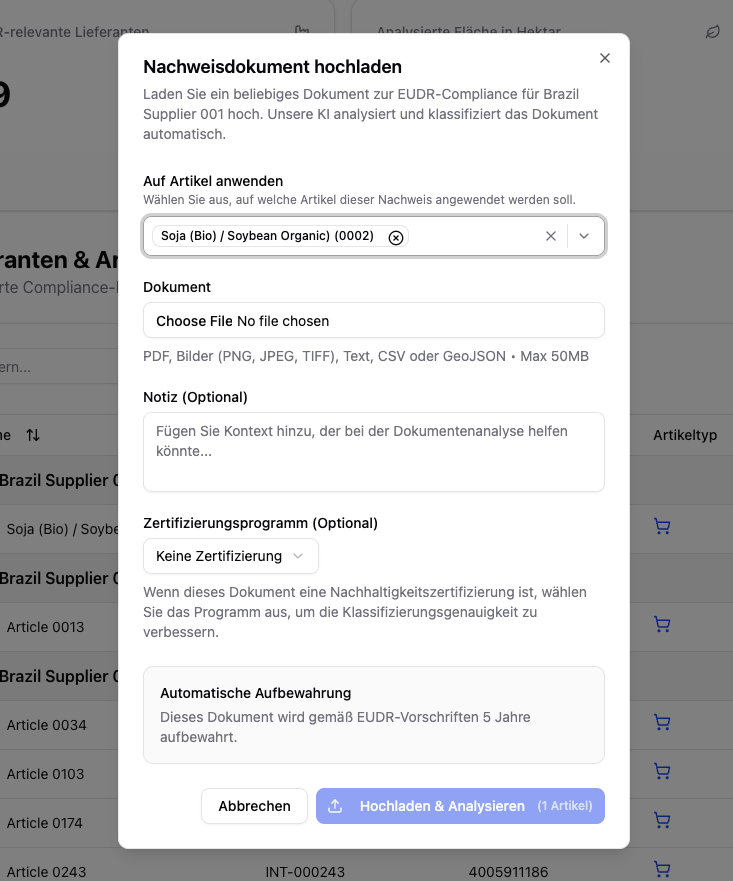
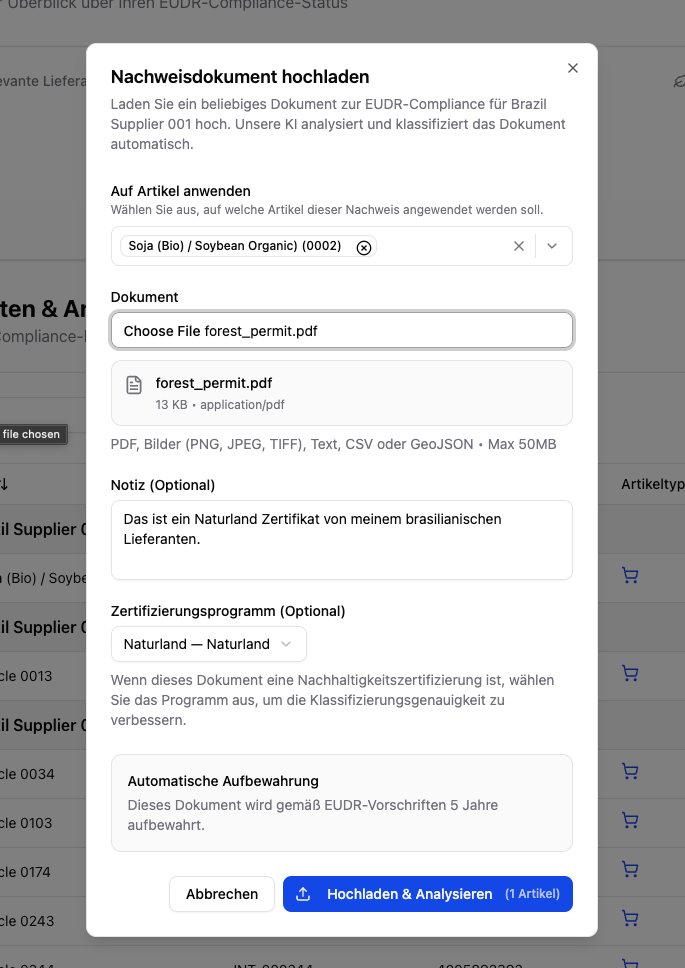
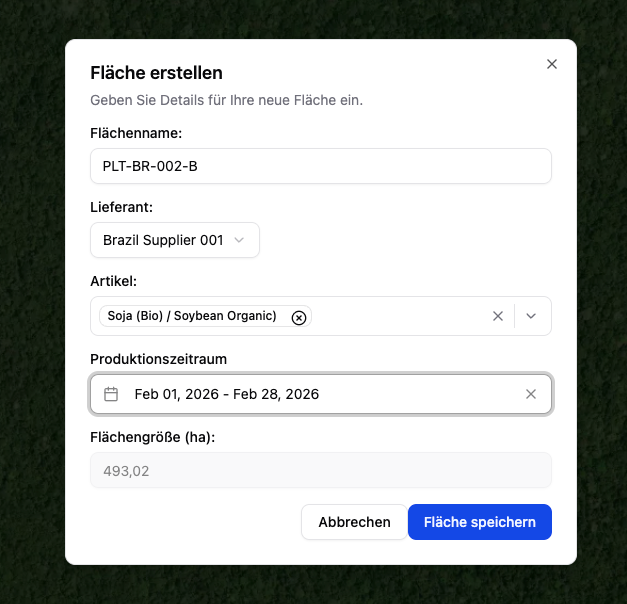
Through the evidence upload, you upload the required compliance evidence for your EUDR-relevant articles. Polygon One automatically analyzes uploaded documents with AI and classifies them accordingly.
When you upload a sustainability certification (e.g. FSC, PEFC, ISCC), Polygon One automatically analyzes which legal compliance categories are covered by the certificate:
Land use rights
Environmental protection
Forestry regulations
Third-party rights
Labor and human rights
Taxes, trade, and customs
Anti-corruption
Covered categories are automatically pre-marked in the legal questionnaire.
An accepted category is not yet a covered category. The certificate also has to reach every plot of the article in the production country concerned. Until it does, the category does not count as covered: the supplier’s questionnaire answers for it keep being assessed, and the category stays open — Pending Review while a plot is still unconfirmed, Non-compliant once a plot has been rejected. See A certificate only covers the plots it is linked to below.
If there are significant inconsistencies in the uploaded document, these are detected and flagged by our analysis. In this special case, we cannot automatically recognize the document; instead, it must be confirmed by
you through a manual review. You can find more details about this process here:
When you upload an FSC or PEFC certificate, Polygon One automatically checks the license against the official register and shows the result as a read-only badge — everywhere the certificate appears (document list, detail view, upload dialog, supplier portal).
Badge
Meaning
Confirmed in register
The license is valid in the register and the holder matches.
Holder name differs
The license is valid, but the registered holder differs — manual review recommended.
License invalid / expired / not in register
The register does not confirm the license as valid — manual review required.
Live check unavailable
The live check could not be completed; the pattern check was applied instead.
For an automatically verified FSC certificate, a negative register finding can withdraw that automatic verification; in every other case the badge is purely informational and does not affect the compliance status. It runs in the background; the badge always shows the most recently stored result.
A certificate only covers the plots it is linked to
An accepted certificate only covers a legal category once it reaches every plot of the article in the production country concerned. Polygon One decides that plot by plot: where the holder named on the certificate matches the producer recorded on the plot and no region detail contradicts it, the plot is linked automatically. Every other plot is put to you as a link to decide.While even one plot is undecided, the certificate contributes nothing to that category — it is on file and accepted, but it does not count yet. The category then does not count as covered: the supplier’s questionnaire answers for it keep being assessed, and the category stays open.
A certificate accepted for one production country says nothing about plots in another. For each country, only the coverage of that country’s plots counts.
What you see on the certificate. The certificate carries a Plot coverage section with up to three lines:
Line
Meaning
”Covers … of … plots”
This many of the associated plots are already evidenced.
”… awaiting confirmation”
These links are waiting for your decision (see the warning below).
”… marked as not covered”
These links you rejected.
If the certificate has no links at all — or it has expired and can evidence nothing — those three lines are not there. In their place stands a single sentence: “This certificate covers no plots.” If the article has no origin plots at all, what stands there instead is the prompt to attach them, record the producer and re-analyse.A certificate whose links you have all rejected is not this case: it still shows the line ”… marked as not covered”.For each open plot the app names why it was proposed, as short chips — among them “Producer matches” or “Producer differs”, “Document region: …” (the region stated in the document), “Region mismatch”, “Period overlaps”, “No period overlap” and the area deviation. Beside the plot name it also prints the plot’s region and size, in grey.In the article’s compliance overview the same state appears in shorter form: under Accepted certificates, each certificate carries either ”… plots awaiting confirmation” or “Not yet linked to any plot”, plus “Valid until …” or “Expired on …”.What to click.
1
Find the open links
Either on the certificate itself in the documents view — or collected in the compliance gaps view under the task “Confirm plot coverage”, which lists every file with open links.
2
Decide per producer, all at once
The fast route is the bulk action “Confirm: covers all … plots of …” — one button per producer. It answers exactly the question that has to be answered: is the certificate holder the producer of these plots? Plots with no producer stated form their own group, “No producer stated”, at the end. This bulk action applies only to the article the certificate sits under here; it reports only how many plot links were confirmed.
3
Decide the exceptions one by one
Each plot offers Confirm and Reject. A single decision reaches further than the bulk action: it applies to this certificate and this plot across every article copy — which is how the app puts it too, with “Confirmed coverage of … across every article copy” or “Removed coverage of …”. It is recorded and persists across re-analysis. You get back via Confirm in the list of rejected plots.
Open and rejected are not the same thing. An open link keeps a category in which a risk was identified at Pending Review — the article is not ready to be declared compliant, but it is not non-compliant either. If you have explicitly rejected a plot and every other plot is confirmed, the category becomes a genuine gap: the certificate no longer evidences it, and an identified risk falls to Non-compliant.Because a single decision applies across every article copy, a rejection made in the article you have open can also pull a different article to non-compliant — but only where a risk was identified in that category and no other certificate or document covers the plot, and only on the next assessment run, not at the moment you click. So reject only what the certificate genuinely does not evidence.
If a category stays open despite an accepted certificate, the cause is almost always the producer on the plot: not recorded, or recorded under a different name than the one on the certificate. Add it using the legal name printed on the certificate — the automatic matching then takes care of the rest. If a re-analysis changes the details you decided about, the app puts the affected links to you again.
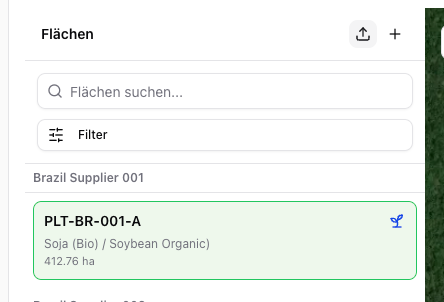
Alternatively, you can import geodata as a file. To do so, click the upload icon at the top left.
Geodata import
We accept the following file formats:
GeoJSON — upload directly
CSV/XLSX with WKT geometry — via the import function under Settings → CSV Imports → Areas
{"docsConfig":{"theme":"mint","$schema":"https://mintlify.com/docs.json","name":"Polygon One Helpcenter","colors":{"primary":"#15803D","light":"#07C983","dark":"#15803D"},"logo":{"light":"https://mintcdn.com/polygonone/AMoRp9VbcW46gNsT/logo/light.svg?fit=max\u0026auto=format\u0026n=AMoRp9VbcW46gNsT\u0026q=85\u0026s=4a316da81d50e49c7f9f6480a235558e","dark":"https://mintcdn.com/polygonone/AMoRp9VbcW46gNsT/logo/dark.svg?fit=max\u0026auto=format\u0026n=AMoRp9VbcW46gNsT\u0026q=85\u0026s=2f010ff600ff4880f154678933ee7214"},"favicon":"https://mintcdn.com/polygonone/ySkQMGGRhMNkPSTt/favicon.svg?fit=max\u0026auto=format\u0026n=ySkQMGGRhMNkPSTt\u0026q=85\u0026s=90cbe4fd3ee2dbffcb8de6167a8d47f3","api":{"playground":{"display":"simple"}},"navbar":{"links":[{"href":"mailto:help@polygon-one.eu","label":"Support"}],"primary":{"type":"button","label":"App","href":"https://app.polygon-one.com/"}},"footer":{"socials":{"website":"https://polygon-one.com"}},"search":{"prompt":"Suche..."},"integrations":{"posthog":{"apiKey":"phc_uKa9gMArvxxjzGfYWUWS4YLP7yT7gPETBzA3ktR7mUTD","apiHost":"https://eu.i.posthog.com","sessionRecording":false}},"contextual":{"options":["copy","view","chatgpt","claude","perplexity","mcp","cursor","vscode"],"display":"header"},"styling":{"latex":false},"navigation":{"global":{"anchors":[]},"languages":[{"language":"de","default":true,"href":""},{"language":"en","href":"en"},{"language":"fr","href":"fr/lieferanten/start"},{"language":"es","href":"es/lieferanten/start"},{"language":"zh","href":"zh/lieferanten/start"}]}},"deployment":{"deploymentMetadataValue":{"subdomain":"polygonone","hasAudioNarration":false,"actualSubdomain":"polygonone","customDomains":["help.polygon-one.com"],"gitSource":{"type":"github","owner":"polygon-one","repo":"docs","deployBranch":"main","contentDirectory":"","isPrivate":true,"mountPath":"","label":""},"chroma":{"liveDeploymentHistoryId":"6ae0b07ed03bec028f0a63ad","collectionId":"0d95f0d6-0f41-4003-828c-a1abdfd66982","schemaVersion":"v3","latestBuiltDeploymentHistoryId":"6ae0b07ed03bec028f0a63ad"},"entitlements":{},"buildId":"6ae0b07ed03bec028f0a63ad","clientVersion":"0.0.3971","searchFilterCounts":[{"language":"de","tag":"API-Referenz","count":62},{"language":"en","tag":"API Reference","count":62},{"language":"de","tag":"EUDR","count":53},{"language":"en","tag":"EUDR","count":53},{"language":"de","tag":"Für Lieferanten","count":28},{"language":"en","tag":"For suppliers","count":28},{"language":"es","tag":"Para proveedores","count":28},{"language":"fr","tag":"Pour les fournisseurs","count":28},{"language":"zh","tag":"供应商帮助","count":28},{"language":"de","tag":"PPWR","count":25},{"language":"en","tag":"PPWR","count":25},{"language":"de","tag":"API-Dokumentation","count":10},{"language":"en","tag":"API Documentation","count":10},{"language":"de","tag":"PPWR – Verpackungsdaten","count":9},{"language":"de","tag":"Ihr Datenformat","count":9},{"language":"en","tag":"PPWR – Packaging Data","count":9},{"language":"en","tag":"Your data format","count":9},{"language":"es","tag":"Su formato de datos","count":9},{"language":"fr","tag":"Votre format de données","count":9},{"language":"zh","tag":"数据格式指南","count":9},{"language":"de","tag":"Datensammlung (Art. 9 EUDR)","count":8},{"language":"de","tag":"DDS \u0026 Bestellungen (Art. 3 EUDR)","count":8},{"language":"de","tag":"Optional","count":8},{"language":"en","tag":"Data Collection (Art. 9 EUDR)","count":8},{"language":"en","tag":"DDS \u0026 Orders (Art. 3 EUDR)","count":8},{"language":"en","tag":"Optional","count":8},{"language":"es","tag":"Solicitud EUDR","count":7},{"language":"fr","tag":"Demande EUDR","count":7},{"language":"zh","tag":"EUDR 请求","count":7},{"language":"es","tag":"Espacio del proveedor","count":4},{"language":"es","tag":"Solicitud PPWR","count":4},{"language":"fr","tag":"Espace fournisseur","count":4},{"language":"fr","tag":"Demande PPWR","count":4},{"language":"zh","tag":"供应商工作区","count":4},{"language":"zh","tag":"PPWR 请求","count":4},{"language":"es","tag":"Resolver un problema","count":3},{"language":"fr","tag":"Résoudre un problème","count":3},{"language":"zh","tag":"更正、审核和状态","count":3},{"language":"es","tag":"Empiece aquí","count":1},{"language":"fr","tag":"Commencer ici","count":1},{"language":"zh","tag":"从这里开始","count":1}]},"assistantConfig":{"enableAskAiButton":false,"enableStarterQuestions":false,"enableAskAiSearchBar":true},"basePath":"","hasChatPermissions":false,"hasWebMcpPermissions":false,"toggles":[{"name":"kill-isr","enabled":true,"variant":{"name":"disabled","enabled":false,"feature_enabled":true},"impressionData":false},{"name":"agent-mintlify-slack","enabled":true,"variant":{"name":"disabled","enabled":false,"feature_enabled":true},"impressionData":false},{"name":"editor-v7-file-tree","enabled":true,"variant":{"name":"disabled","enabled":false,"feature_enabled":true},"impressionData":false},{"name":"agent-integrations-settings","enabled":true,"variant":{"name":"disabled","enabled":false,"feature_enabled":true},"impressionData":false},{"name":"automations-pr-grouping","enabled":true,"variant":{"name":"disabled","enabled":false,"feature_enabled":true},"impressionData":false},{"name":"custom-prefix","enabled":true,"variant":{"name":"disabled","enabled":false,"feature_enabled":true},"impressionData":false},{"name":"analytics-v7","enabled":true,"variant":{"name":"disabled","enabled":false,"feature_enabled":true},"impressionData":false},{"name":"user-flows-analytics","enabled":true,"variant":{"name":"disabled","enabled":false,"feature_enabled":true},"impressionData":false},{"name":"no-publish-flow","enabled":true,"variant":{"name":"disabled","enabled":false,"feature_enabled":true},"impressionData":false},{"name":"workos-onboarding","enabled":true,"variant":{"name":"disabled","enabled":false,"feature_enabled":true},"impressionData":false},{"name":"llms-txt-v2","enabled":true,"variant":{"name":"disabled","enabled":false,"feature_enabled":true},"impressionData":false},{"name":"pause-universal-search-reconcile","enabled":true,"variant":{"name":"disabled","enabled":false,"feature_enabled":true},"impressionData":false},{"name":"snapshot-serving-live","enabled":true,"variant":{"name":"disabled","enabled":false,"feature_enabled":true},"impressionData":false},{"name":"stripTemperatureMiddleware","enabled":true,"variant":{"name":"disabled","enabled":false,"feature_enabled":true},"impressionData":false},{"name":"per-site-search-delta","enabled":true,"variant":{"name":"disabled","enabled":false,"feature_enabled":true},"impressionData":false},{"name":"support-platform-pylon-zendesk","enabled":true,"variant":{"name":"disabled","enabled":false,"feature_enabled":true},"impressionData":false},{"name":"snapshot-serving","enabled":true,"variant":{"name":"disabled","enabled":false,"feature_enabled":true},"impressionData":false},{"name":"instant-rollback","enabled":true,"variant":{"name":"disabled","enabled":false,"feature_enabled":true},"impressionData":false},{"name":"granular-notifications-server","enabled":true,"variant":{"name":"disabled","enabled":false,"feature_enabled":true},"impressionData":false},{"name":"granular-notifications","enabled":true,"variant":{"name":"disabled","enabled":false,"feature_enabled":true},"impressionData":false},{"name":"editor-private-page-search","enabled":true,"variant":{"name":"disabled","enabled":false,"feature_enabled":true},"impressionData":false},{"name":"automations-fable","enabled":true,"variant":{"name":"disabled","enabled":false,"feature_enabled":true},"impressionData":false},{"name":"fixed-ai-action-pricing","enabled":true,"variant":{"name":"disabled","enabled":false,"feature_enabled":true},"impressionData":false},{"name":"automation-resolve-merge-conflict","enabled":true,"variant":{"name":"disabled","enabled":false,"feature_enabled":true},"impressionData":false},{"name":"scoped-publishing","enabled":true,"variant":{"name":"disabled","enabled":false,"feature_enabled":true},"impressionData":false},{"name":"mintql","enabled":true,"variant":{"name":"disabled","enabled":false,"feature_enabled":true},"impressionData":false},{"name":"page-level-analytics","enabled":true,"variant":{"name":"disabled","enabled":false,"feature_enabled":true},"impressionData":false},{"name":"editor-version-history-v2","enabled":true,"variant":{"name":"disabled","enabled":false,"feature_enabled":true},"impressionData":false},{"name":"editor-nav-generations","enabled":true,"variant":{"name":"disabled","enabled":false,"feature_enabled":true},"impressionData":false},{"name":"billing-page-v2","enabled":true,"variant":{"name":"disabled","enabled":false,"feature_enabled":true},"impressionData":false},{"name":"workspace-projects","enabled":true,"variant":{"name":"disabled","enabled":false,"feature_enabled":true},"impressionData":false},{"name":"assistant-v5","enabled":true,"variant":{"name":"disabled","enabled":false,"feature_enabled":true},"impressionData":false},{"name":"byok-sep-25","enabled":true,"variant":{"name":"disabled","enabled":false,"feature_enabled":true},"impressionData":false},{"name":"fork-pr-previews","enabled":true,"variant":{"name":"disabled","enabled":false,"feature_enabled":true},"impressionData":false},{"name":"revalidation-jwt","enabled":true,"variant":{"name":"disabled","enabled":false,"feature_enabled":true},"impressionData":false},{"name":"vite-origin","enabled":true,"variant":{"name":"disabled","enabled":false,"feature_enabled":true},"impressionData":false},{"name":"editor-agent-model-picker","enabled":true,"variant":{"name":"disabled","enabled":false,"feature_enabled":true},"impressionData":false},{"name":"billing-updated-9-15","enabled":true,"variant":{"name":"disabled","enabled":false,"feature_enabled":true},"impressionData":false},{"name":"workos-sso-scim","enabled":true,"variant":{"name":"disabled","enabled":false,"feature_enabled":true},"impressionData":false},{"name":"hobby-abuse-scan","enabled":true,"variant":{"name":"disabled","enabled":false,"feature_enabled":true},"impressionData":false},{"name":"dashboard-inbox","enabled":true,"variant":{"name":"disabled","enabled":false,"feature_enabled":true},"impressionData":false},{"name":"workos-signup","enabled":true,"variant":{"name":"disabled","enabled":false,"feature_enabled":true},"impressionData":false},{"name":"workos-enabled","enabled":true,"variant":{"name":"disabled","enabled":false,"feature_enabled":true},"impressionData":false}],"isAtlas":false,"googleFontsInlined":false},"customCss":[{"filePath":"style.css","content":"html:has(#content[data-page-href$=\"/lieferanten/start\"]) #pagination,html:has(#content[data-page-href*=\"/lieferanten/\"]) #mobile-nav #navigation-items>div:has(>#localization-select-trigger)>div:has(>button[aria-haspopup=menu]),html:has(#content[data-page-href*=\"/lieferanten/\"]) #navbar div:has(>div>a[href$=\"/lieferanten/start\"]),html:has(#content[data-page-href*=\"/lieferanten/\"]) #navbar li:has(>a[href=\"https://app.polygon-one.com/\"]),html:has(#content[data-page-href*=\"/lieferanten/\"]) [role=dialog] li:has(>a[href=\"https://app.polygon-one.com/\"]){display:none!important}"}],"page":{"pagePath":"en/eudr/datensammlung/evidence-upload","slug":"/en/eudr/datensammlung/evidence-upload","pageMetadata":{"title":"Upload Evidence","description":"Upload documents and geodata for EUDR compliance","icon":"upload","href":"/en/eudr/datensammlung/evidence-upload"},"description":{"compiledSource":"\"use strict\";\nconst {jsx: _jsx} = arguments[0];\nconst {useMDXComponents: _provideComponents} = arguments[0];\nfunction _createMdxContent(props) {\n const _components = {\n p: \"p\",\n ..._provideComponents(),\n ...props.components\n };\n return _jsx(_components.p, {\n children: \"Upload documents and geodata for EUDR compliance\"\n });\n}\nfunction MDXContent(props = {}) {\n const {wrapper: MDXLayout} = {\n ..._provideComponents(),\n ...props.components\n };\n return MDXLayout ? _jsx(MDXLayout, {\n ...props,\n children: _jsx(_createMdxContent, {\n ...props\n })\n }) : _createMdxContent(props);\n}\nreturn {\n default: MDXContent\n};\n","frontmatter":{},"scope":{}},"pageType":"default","mdx":{"mdxSource":{"compiledSource":"\"use strict\";const{Fragment:_Fragment,jsx:_jsx,jsxs:_jsxs}=arguments[0];const{useMDXComponents:_provideComponents}=arguments[0];function _createMdxContent(props){const _components={a:`a`,code:`code`,li:`li`,p:`p`,strong:`strong`,tbody:`tbody`,td:`td`,th:`th`,thead:`thead`,tr:`tr`,ul:`ul`,..._provideComponents(),...props.components},{Frame,Heading,Info,Note,OptimizedImage,Step,Steps,Table,Tip,Warning}=_components;if(!Frame)_missingMdxReference(`Frame`,true);if(!Heading)_missingMdxReference(`Heading`,true);if(!Info)_missingMdxReference(`Info`,true);if(!Note)_missingMdxReference(`Note`,true);if(!OptimizedImage)_missingMdxReference(`OptimizedImage`,true);if(!Step)_missingMdxReference(`Step`,true);if(!Steps)_missingMdxReference(`Steps`,true);if(!Table)_missingMdxReference(`Table`,true);if(!Tip)_missingMdxReference(`Tip`,true);if(!Warning)_missingMdxReference(`Warning`,true);return _jsxs(_Fragment,{children:[_jsx(Heading,{level:`2`,id:`overview`,children:`Overview`}),`\n`,_jsxs(_components.p,{children:[`Through the `,_jsx(_components.strong,{children:`evidence upload`}),`, you upload the required compliance evidence for your EUDR-relevant articles. Polygon One automatically analyzes uploaded documents with AI and classifies them accordingly.`]}),`\n`,_jsx(Heading,{level:`2`,id:`uploading-documents`,children:`Uploading Documents`}),`\n`,_jsx(Heading,{level:`3`,id:`supported-formats`,children:`Supported Formats`}),`\n`,_jsxs(_components.ul,{children:[`\n`,_jsx(_components.li,{children:`PDF documents`}),`\n`,_jsx(_components.li,{children:`Images (PNG, JPEG, TIFF)`}),`\n`,_jsx(_components.li,{children:`Text files`}),`\n`,_jsx(_components.li,{children:`CSV and JSON`}),`\n`,_jsx(_components.li,{children:`GeoJSON (for geodata)`}),`\n`,_jsxs(_components.li,{children:[_jsx(_components.strong,{children:`Office files`}),` — Word (`,_jsx(_components.code,{children:`.doc`}),`, `,_jsx(_components.code,{children:`.docx`}),`), Excel (`,_jsx(_components.code,{children:`.xls`}),`, `,_jsx(_components.code,{children:`.xlsx`}),`), ODT, RTF — where document conversion is set up for your installation`]}),`\n`,_jsxs(_components.li,{children:[`Maximum file size: `,_jsx(_components.strong,{children:`10 MB`})]}),`\n`]}),`\n`,_jsxs(_components.p,{children:[`Whether Office files are offered in your environment is stated by the upload dialog itself — see `,_jsx(_components.a,{href:`/en/eudr/optional/dokumente`,children:`Documents → Accepted File Formats`}),`.`]}),`\n`,_jsx(Heading,{level:`3`,id:`examples-of-accepted-documents`,children:`Examples of Accepted Documents`}),`\n`,_jsxs(_components.ul,{children:[`\n`,_jsx(_components.li,{children:`FLEGT licenses`}),`\n`,_jsx(_components.li,{children:`FSC/PEFC/ISCC/Rainforest Alliance certificates`}),`\n`,_jsx(_components.li,{children:`Land ownership titles and usage rights`}),`\n`,_jsx(_components.li,{children:`Harvesting permits and environmental approvals`}),`\n`,_jsx(_components.li,{children:`Customs declarations`}),`\n`]}),`\n`,_jsx(Heading,{level:`3`,id:`uploading-evidence`,children:`Uploading Evidence`}),`\n`,_jsxs(Steps,{children:[_jsx(Step,{title:`Select an article`,children:_jsx(_components.p,{children:`Navigate to the article you want in the compliance dashboard.`})}),_jsxs(Step,{title:`Start the upload`,children:[_jsxs(_components.p,{children:[`Click `,_jsx(_components.strong,{children:`“Upload evidence”`}),` and select the file.`]}),_jsx(Frame,{caption:`Upload dialog for evidence documents`,children:_jsx(OptimizedImage,{src:`https://mintcdn.com/polygonone/_SsU3tTjFG0HMvPa/images/helpcenter/datensammlung/evidence-upload-dialog.png?fit=max\u0026auto=format\u0026n=_SsU3tTjFG0HMvPa\u0026q=85\u0026s=ee63cbaf9a235b9b730318c4d718549d`,\"data-og-width\":`733`,width:`733`,\"data-og-height\":`881`,height:`881`,\"data-path\":`images/helpcenter/datensammlung/evidence-upload-dialog.png`,\"data-optimize\":`true`,\"data-opv\":`3`,srcset:`https://mintcdn.com/polygonone/_SsU3tTjFG0HMvPa/images/helpcenter/datensammlung/evidence-upload-dialog.png?w=280\u0026fit=max\u0026auto=format\u0026n=_SsU3tTjFG0HMvPa\u0026q=85\u0026s=c902f6c7b2ddc8730b51d524a5fad847 280w, https://mintcdn.com/polygonone/_SsU3tTjFG0HMvPa/images/helpcenter/datensammlung/evidence-upload-dialog.png?w=560\u0026fit=max\u0026auto=format\u0026n=_SsU3tTjFG0HMvPa\u0026q=85\u0026s=a29455af6f58f10eb817df20f3f54d47 560w, https://mintcdn.com/polygonone/_SsU3tTjFG0HMvPa/images/helpcenter/datensammlung/evidence-upload-dialog.png?w=840\u0026fit=max\u0026auto=format\u0026n=_SsU3tTjFG0HMvPa\u0026q=85\u0026s=78d7ecc87c4425d44ae86db13cee0c10 840w, https://mintcdn.com/polygonone/_SsU3tTjFG0HMvPa/images/helpcenter/datensammlung/evidence-upload-dialog.png?w=1100\u0026fit=max\u0026auto=format\u0026n=_SsU3tTjFG0HMvPa\u0026q=85\u0026s=06b7594f57fe57035c59ceeee76ff3f7 1100w, https://mintcdn.com/polygonone/_SsU3tTjFG0HMvPa/images/helpcenter/datensammlung/evidence-upload-dialog.png?w=1650\u0026fit=max\u0026auto=format\u0026n=_SsU3tTjFG0HMvPa\u0026q=85\u0026s=ce82f343fc612ee606ee46eff22e95a0 1650w, https://mintcdn.com/polygonone/_SsU3tTjFG0HMvPa/images/helpcenter/datensammlung/evidence-upload-dialog.png?w=2500\u0026fit=max\u0026auto=format\u0026n=_SsU3tTjFG0HMvPa\u0026q=85\u0026s=927d75a267a7130375904495a5105314 2500w`})})]}),_jsxs(Step,{title:`Certification program (optional)`,children:[_jsxs(_components.p,{children:[`If the document is a sustainability certification, select the `,_jsx(_components.strong,{children:`certification scheme`}),` (e.g. FSC, PEFC, RSPO). This improves classification accuracy.`]}),_jsx(Frame,{caption:`Selecting the certification scheme`,children:_jsx(OptimizedImage,{src:`https://mintcdn.com/polygonone/_SsU3tTjFG0HMvPa/images/helpcenter/datensammlung/evidence-zertifizierung.png?fit=max\u0026auto=format\u0026n=_SsU3tTjFG0HMvPa\u0026q=85\u0026s=21e10cca508414727a3ef2747b4e88a8`,\"data-og-width\":`685`,width:`685`,\"data-og-height\":`968`,height:`968`,\"data-path\":`images/helpcenter/datensammlung/evidence-zertifizierung.png`,\"data-optimize\":`true`,\"data-opv\":`3`,srcset:`https://mintcdn.com/polygonone/_SsU3tTjFG0HMvPa/images/helpcenter/datensammlung/evidence-zertifizierung.png?w=280\u0026fit=max\u0026auto=format\u0026n=_SsU3tTjFG0HMvPa\u0026q=85\u0026s=feb78714d0c6f3327c87c46bf8391deb 280w, https://mintcdn.com/polygonone/_SsU3tTjFG0HMvPa/images/helpcenter/datensammlung/evidence-zertifizierung.png?w=560\u0026fit=max\u0026auto=format\u0026n=_SsU3tTjFG0HMvPa\u0026q=85\u0026s=98b02e4decbc6727333696770b7f93dd 560w, https://mintcdn.com/polygonone/_SsU3tTjFG0HMvPa/images/helpcenter/datensammlung/evidence-zertifizierung.png?w=840\u0026fit=max\u0026auto=format\u0026n=_SsU3tTjFG0HMvPa\u0026q=85\u0026s=665a93ca85bb2c7ff65e3c0562ba5a60 840w, https://mintcdn.com/polygonone/_SsU3tTjFG0HMvPa/images/helpcenter/datensammlung/evidence-zertifizierung.png?w=1100\u0026fit=max\u0026auto=format\u0026n=_SsU3tTjFG0HMvPa\u0026q=85\u0026s=c5d2e8e9ef67ce33e1214f83bc0e88f0 1100w, https://mintcdn.com/polygonone/_SsU3tTjFG0HMvPa/images/helpcenter/datensammlung/evidence-zertifizierung.png?w=1650\u0026fit=max\u0026auto=format\u0026n=_SsU3tTjFG0HMvPa\u0026q=85\u0026s=6040a56b935124ceac3aa778836ddb34 1650w, https://mintcdn.com/polygonone/_SsU3tTjFG0HMvPa/images/helpcenter/datensammlung/evidence-zertifizierung.png?w=2500\u0026fit=max\u0026auto=format\u0026n=_SsU3tTjFG0HMvPa\u0026q=85\u0026s=632fea6701ff1ab5df596b3ec2417144 2500w`})})]}),_jsx(Step,{title:`Add a note (optional)`,children:_jsx(_components.p,{children:`Add context that could help with the document analysis (e.g. “Certificate of origin for shipment #12345”).`})}),_jsx(Step,{title:`Upload \u0026 Analyze`,children:_jsxs(_components.p,{children:[`Click `,_jsx(_components.strong,{children:`“Upload \u0026 Analyze”`}),`. The AI automatically analyzes and classifies the document.`]})})]}),`\n`,_jsx(Info,{children:_jsxs(_components.p,{children:[`Uploaded documents are automatically `,_jsx(_components.strong,{children:`retained for 5 years`}),` in accordance with EUDR regulations.`]})}),`\n`,_jsx(Heading,{level:`3`,id:`certifications`,children:`Certifications`}),`\n`,_jsxs(_components.p,{children:[`When you upload a sustainability certification (e.g. FSC, PEFC, ISCC), Polygon One automatically analyzes which `,_jsx(_components.strong,{children:`legal compliance categories`}),` are covered by the certificate:`]}),`\n`,_jsxs(_components.ul,{children:[`\n`,_jsx(_components.li,{children:`Land use rights`}),`\n`,_jsx(_components.li,{children:`Environmental protection`}),`\n`,_jsx(_components.li,{children:`Forestry regulations`}),`\n`,_jsx(_components.li,{children:`Third-party rights`}),`\n`,_jsx(_components.li,{children:`Labor and human rights`}),`\n`,_jsx(_components.li,{children:`Taxes, trade, and customs`}),`\n`,_jsx(_components.li,{children:`Anti-corruption`}),`\n`]}),`\n`,_jsx(_components.p,{children:`Covered categories are automatically pre-marked in the legal questionnaire.`}),`\n`,_jsx(Note,{children:_jsxs(_components.p,{children:[_jsx(_components.strong,{children:`An accepted category is not yet a covered category.`}),` The certificate also has to reach every plot of the article in the production country concerned. Until it does, the category does not count as covered: the supplier’s questionnaire answers for it keep being assessed, and the category stays open — Pending Review while a plot is still unconfirmed, Non-compliant once a plot has been rejected. See `,_jsx(_components.a,{href:`#a-certificate-only-covers-the-plots-it-is-linked-to`,children:`A certificate only covers the plots it is linked to`}),` below.`]})}),`\n`,_jsx(_components.p,{children:`If there are significant inconsistencies in the uploaded document, these are detected and flagged by our analysis. In this special case, we cannot automatically recognize the document; instead, it must be confirmed by\nyou through a manual review. You can find more details about this process here:`}),`\n`,_jsx(Heading,{level:`3`,id:`certificate-register-check-fsc/pefc`,children:`Certificate Register Check (FSC/PEFC)`}),`\n`,_jsxs(_components.p,{children:[`When you upload an `,_jsx(_components.strong,{children:`FSC or PEFC certificate`}),`, Polygon One automatically checks the license against the `,_jsx(_components.strong,{children:`official register`}),` and shows the result as a read-only `,_jsx(_components.strong,{children:`badge`}),` — everywhere the certificate appears (document list, detail view, upload dialog, supplier portal).`]}),`\n`,_jsxs(Table,{children:[_jsx(_components.thead,{children:_jsxs(_components.tr,{children:[_jsx(_components.th,{children:`Badge`}),_jsx(_components.th,{children:`Meaning`})]})}),_jsxs(_components.tbody,{children:[_jsxs(_components.tr,{children:[_jsx(_components.td,{children:_jsx(_components.strong,{children:`Confirmed in register`})}),_jsx(_components.td,{children:`The license is valid in the register and the holder matches.`})]}),_jsxs(_components.tr,{children:[_jsx(_components.td,{children:_jsx(_components.strong,{children:`Holder name differs`})}),_jsx(_components.td,{children:`The license is valid, but the registered holder differs — manual review recommended.`})]}),_jsxs(_components.tr,{children:[_jsx(_components.td,{children:_jsx(_components.strong,{children:`License invalid / expired / not in register`})}),_jsx(_components.td,{children:`The register does not confirm the license as valid — manual review required.`})]}),_jsxs(_components.tr,{children:[_jsx(_components.td,{children:_jsx(_components.strong,{children:`Live check unavailable`})}),_jsx(_components.td,{children:`The live check could not be completed; the pattern check was applied instead.`})]})]})]}),`\n`,_jsx(Info,{children:_jsxs(_components.p,{children:[`For an automatically verified FSC certificate, a negative register finding can withdraw that automatic verification; in every other case the badge is purely `,_jsx(_components.strong,{children:`informational`}),` and does not affect the compliance status. It runs in the background; the badge always shows the most recently stored result.`]})}),`\n`,_jsx(Heading,{level:`3`,id:`a-certificate-only-covers-the-plots-it-is-linked-to`,children:`A certificate only covers the plots it is linked to`}),`\n`,_jsxs(_components.p,{children:[`An accepted certificate only covers a legal category once it reaches `,_jsx(_components.strong,{children:`every`}),` plot of the article in the production country concerned. Polygon One decides that plot by plot: where the holder named on the certificate matches the `,_jsx(_components.strong,{children:`producer`}),` recorded on the plot and no region detail contradicts it, the plot is linked automatically. Every other plot is put to you as a link to decide.`]}),`\n`,_jsxs(_components.p,{children:[`While even one plot is undecided, the certificate contributes `,_jsx(_components.strong,{children:`nothing`}),` to that category — it is on file and accepted, but it does not count yet. The category then does not count as covered: the supplier’s questionnaire answers for it keep being assessed, and the category stays open.`]}),`\n`,_jsx(Note,{children:_jsxs(_components.p,{children:[`A certificate accepted for one production country says nothing about plots in another. For each country, only the coverage of `,_jsx(_components.strong,{children:`that`}),` country’s plots counts.`]})}),`\n`,_jsxs(_components.p,{children:[_jsx(_components.strong,{children:`What you see on the certificate.`}),` The certificate carries a `,_jsx(_components.strong,{children:`Plot coverage`}),` section with up to three lines:`]}),`\n`,_jsxs(Table,{children:[_jsx(_components.thead,{children:_jsxs(_components.tr,{children:[_jsx(_components.th,{children:`Line`}),_jsx(_components.th,{children:`Meaning`})]})}),_jsxs(_components.tbody,{children:[_jsxs(_components.tr,{children:[_jsx(_components.td,{children:_jsx(_components.strong,{children:`”Covers … of … plots”`})}),_jsx(_components.td,{children:`This many of the associated plots are already evidenced.`})]}),_jsxs(_components.tr,{children:[_jsx(_components.td,{children:_jsx(_components.strong,{children:`”… awaiting confirmation”`})}),_jsx(_components.td,{children:`These links are waiting for your decision (see the warning below).`})]}),_jsxs(_components.tr,{children:[_jsx(_components.td,{children:_jsx(_components.strong,{children:`”… marked as not covered”`})}),_jsx(_components.td,{children:`These links you rejected.`})]})]})]}),`\n`,_jsxs(_components.p,{children:[`If the certificate has no links at all — or it has expired and can evidence nothing — those three lines are not there. In their place stands a single sentence: `,_jsx(_components.strong,{children:`“This certificate covers no plots.”`}),` If the article has no origin plots at all, what stands there instead is the prompt to attach them, record the producer and re-analyse.`]}),`\n`,_jsxs(_components.p,{children:[`A certificate whose links you have `,_jsx(_components.strong,{children:`all rejected`}),` is not this case: it still shows the line `,_jsx(_components.strong,{children:`”… marked as not covered”`}),`.`]}),`\n`,_jsxs(_components.p,{children:[`For each open plot the app names why it was proposed, as short chips — among them `,_jsx(_components.strong,{children:`“Producer matches”`}),` or `,_jsx(_components.strong,{children:`“Producer differs”`}),`, `,_jsx(_components.strong,{children:`“Document region: …”`}),` (the region stated in the document), `,_jsx(_components.strong,{children:`“Region mismatch”`}),`, `,_jsx(_components.strong,{children:`“Period overlaps”`}),`, `,_jsx(_components.strong,{children:`“No period overlap”`}),` and the area deviation. Beside the plot name it also prints the plot’s region and size, in grey.`]}),`\n`,_jsxs(_components.p,{children:[`In the article’s compliance overview the same state appears in shorter form: under `,_jsx(_components.strong,{children:`Accepted certificates`}),`, each certificate carries either `,_jsx(_components.strong,{children:`”… plots awaiting confirmation”`}),` or `,_jsx(_components.strong,{children:`“Not yet linked to any plot”`}),`, plus `,_jsx(_components.strong,{children:`“Valid until …”`}),` or `,_jsx(_components.strong,{children:`“Expired on …”`}),`.`]}),`\n`,_jsx(_components.p,{children:_jsx(_components.strong,{children:`What to click.`})}),`\n`,_jsxs(Steps,{children:[_jsx(Step,{title:`Find the open links`,children:_jsxs(_components.p,{children:[`Either on the certificate itself in the documents view — or collected in the compliance gaps view under the task `,_jsx(_components.strong,{children:`“Confirm plot coverage”`}),`, which lists every file with open links.`]})}),_jsx(Step,{title:`Decide per producer, all at once`,children:_jsxs(_components.p,{children:[`The fast route is the bulk action `,_jsx(_components.strong,{children:`“Confirm: covers all … plots of …”`}),` — one button per producer. It answers exactly the question that has to be answered: is the certificate holder the producer of these plots? Plots with no producer stated form their own group, `,_jsx(_components.strong,{children:`“No producer stated”`}),`, at the end. This bulk action applies `,_jsx(_components.strong,{children:`only to the article`}),` the certificate sits under here; it reports only how many plot links were confirmed.`]})}),_jsx(Step,{title:`Decide the exceptions one by one`,children:_jsxs(_components.p,{children:[`Each plot offers `,_jsx(_components.strong,{children:`Confirm`}),` and `,_jsx(_components.strong,{children:`Reject`}),`. A single decision reaches further than the bulk action: it applies to this certificate and this plot across `,_jsx(_components.strong,{children:`every article copy`}),` — which is how the app puts it too, with `,_jsx(_components.strong,{children:`“Confirmed coverage of … across every article copy”`}),` or `,_jsx(_components.strong,{children:`“Removed coverage of …”`}),`. It is recorded and persists across re-analysis. You get back via `,_jsx(_components.strong,{children:`Confirm`}),` in the list of rejected plots.`]})})]}),`\n`,_jsxs(Warning,{children:[_jsxs(_components.p,{children:[_jsx(_components.strong,{children:`Open and rejected are not the same thing.`}),` An `,_jsx(_components.strong,{children:`open`}),` link keeps a category in which a risk was identified at `,_jsx(_components.strong,{children:`Pending Review`}),` — the article is not ready to be declared compliant, but it is not non-compliant either. If you have explicitly `,_jsx(_components.strong,{children:`rejected`}),` a plot and every other plot is confirmed, the category becomes a genuine gap: the certificate no longer evidences it, and an identified risk falls to `,_jsx(_components.strong,{children:`Non-compliant`}),`.`]}),_jsxs(_components.p,{children:[`Because a single decision applies across every article copy, a rejection made in the article you have open can also pull a `,_jsx(_components.strong,{children:`different`}),` article to non-compliant — but only where a risk was identified in that category and no other certificate or document covers the plot, and only on the next assessment run, not at the moment you click. So reject only what the certificate genuinely does not evidence.`]})]}),`\n`,_jsx(Tip,{children:_jsxs(_components.p,{children:[`If a category stays open despite an accepted certificate, the cause is almost always the `,_jsx(_components.strong,{children:`producer on the plot`}),`: not recorded, or recorded under a different name than the one on the certificate. Add it using the legal name printed on the certificate — the automatic matching then takes care of the rest. If a re-analysis changes the details you decided about, the app puts the affected links to you again.`]})}),`\n`,_jsx(Heading,{level:`2`,id:`capturing-geodata`,children:`Capturing Geodata`}),`\n`,_jsx(_components.p,{children:`Geodata (production locations) are a central component of EUDR compliance. You can provide geodata in several ways:`}),`\n`,_jsx(Heading,{level:`3`,id:`drawing-geodata-on-the-map`,children:`Drawing Geodata on the Map`}),`\n`,_jsxs(Steps,{children:[_jsx(Step,{title:`Open the map view`,children:_jsx(_components.p,{children:`Navigate to the article and open the map view.`})}),_jsxs(Step,{title:`Draw the area`,children:[_jsxs(_components.p,{children:[`Click `,_jsx(_components.strong,{children:`“Draw area”`}),` and mark the corner points of your production area on the map. Press `,_jsx(_components.strong,{children:`Escape`}),` to cancel drawing.`]}),_jsx(Frame,{caption:`Drawing a production area on the interactive map`,children:_jsx(OptimizedImage,{src:`https://mintcdn.com/polygonone/_SsU3tTjFG0HMvPa/images/helpcenter/datensammlung/evidence-karte-zeichnen.png?fit=max\u0026auto=format\u0026n=_SsU3tTjFG0HMvPa\u0026q=85\u0026s=422093fa41e7f84f151b8ff4d25d3663`,\"data-og-width\":`627`,width:`627`,\"data-og-height\":`604`,height:`604`,\"data-path\":`images/helpcenter/datensammlung/evidence-karte-zeichnen.png`,\"data-optimize\":`true`,\"data-opv\":`3`,srcset:`https://mintcdn.com/polygonone/_SsU3tTjFG0HMvPa/images/helpcenter/datensammlung/evidence-karte-zeichnen.png?w=280\u0026fit=max\u0026auto=format\u0026n=_SsU3tTjFG0HMvPa\u0026q=85\u0026s=0da90b3635c01df40d923725a1066a09 280w, https://mintcdn.com/polygonone/_SsU3tTjFG0HMvPa/images/helpcenter/datensammlung/evidence-karte-zeichnen.png?w=560\u0026fit=max\u0026auto=format\u0026n=_SsU3tTjFG0HMvPa\u0026q=85\u0026s=f6dcf6c370aa9818518fa831400a989c 560w, https://mintcdn.com/polygonone/_SsU3tTjFG0HMvPa/images/helpcenter/datensammlung/evidence-karte-zeichnen.png?w=840\u0026fit=max\u0026auto=format\u0026n=_SsU3tTjFG0HMvPa\u0026q=85\u0026s=5e22d91c5e6d1254720b5ae8a1dc7a23 840w, https://mintcdn.com/polygonone/_SsU3tTjFG0HMvPa/images/helpcenter/datensammlung/evidence-karte-zeichnen.png?w=1100\u0026fit=max\u0026auto=format\u0026n=_SsU3tTjFG0HMvPa\u0026q=85\u0026s=95f5baf149d520ec50edf974df0c8b0a 1100w, https://mintcdn.com/polygonone/_SsU3tTjFG0HMvPa/images/helpcenter/datensammlung/evidence-karte-zeichnen.png?w=1650\u0026fit=max\u0026auto=format\u0026n=_SsU3tTjFG0HMvPa\u0026q=85\u0026s=8910ea6bb066d6e9749e87d44f6942f1 1650w, https://mintcdn.com/polygonone/_SsU3tTjFG0HMvPa/images/helpcenter/datensammlung/evidence-karte-zeichnen.png?w=2500\u0026fit=max\u0026auto=format\u0026n=_SsU3tTjFG0HMvPa\u0026q=85\u0026s=475a082298382d54181a527f841021a6 2500w`})})]}),_jsx(Step,{title:`Enter the details`,children:_jsx(_components.p,{children:`Enter the area name, supplier, article, the scientific name if applicable (required for wood), and the production period.`})}),_jsx(Step,{title:`Save`,children:_jsx(_components.p,{children:`Confirm the details and save the area. The satellite analysis starts automatically.`})})]}),`\n`,_jsx(Heading,{level:`3`,id:`importing-geodata`,children:`Importing Geodata`}),`\n`,_jsx(_components.p,{children:`Alternatively, you can import geodata as a file. To do so, click the upload icon at the top left.`}),`\n`,_jsx(Frame,{caption:`Geodata import`,children:_jsx(OptimizedImage,{src:`https://mintcdn.com/polygonone/_SsU3tTjFG0HMvPa/images/helpcenter/datensammlung/evidence-geodaten-import.png?fit=max\u0026auto=format\u0026n=_SsU3tTjFG0HMvPa\u0026q=85\u0026s=a926cbcc1c84acb62c070985e84d330d`,\"data-og-width\":`444`,width:`444`,\"data-og-height\":`302`,height:`302`,\"data-path\":`images/helpcenter/datensammlung/evidence-geodaten-import.png`,\"data-optimize\":`true`,\"data-opv\":`3`,srcset:`https://mintcdn.com/polygonone/_SsU3tTjFG0HMvPa/images/helpcenter/datensammlung/evidence-geodaten-import.png?w=280\u0026fit=max\u0026auto=format\u0026n=_SsU3tTjFG0HMvPa\u0026q=85\u0026s=7dd8b592e82c8f84e0a991d686807be0 280w, https://mintcdn.com/polygonone/_SsU3tTjFG0HMvPa/images/helpcenter/datensammlung/evidence-geodaten-import.png?w=560\u0026fit=max\u0026auto=format\u0026n=_SsU3tTjFG0HMvPa\u0026q=85\u0026s=fcbe9da5603c7639d5543e3022577a9a 560w, https://mintcdn.com/polygonone/_SsU3tTjFG0HMvPa/images/helpcenter/datensammlung/evidence-geodaten-import.png?w=840\u0026fit=max\u0026auto=format\u0026n=_SsU3tTjFG0HMvPa\u0026q=85\u0026s=0e03adc02f2f052b250ffcaae6e470ce 840w, https://mintcdn.com/polygonone/_SsU3tTjFG0HMvPa/images/helpcenter/datensammlung/evidence-geodaten-import.png?w=1100\u0026fit=max\u0026auto=format\u0026n=_SsU3tTjFG0HMvPa\u0026q=85\u0026s=164f86617cd04b6a03b25369c274e366 1100w, https://mintcdn.com/polygonone/_SsU3tTjFG0HMvPa/images/helpcenter/datensammlung/evidence-geodaten-import.png?w=1650\u0026fit=max\u0026auto=format\u0026n=_SsU3tTjFG0HMvPa\u0026q=85\u0026s=dcc7127d5a36708adc6c237fd57aaa9b 1650w, https://mintcdn.com/polygonone/_SsU3tTjFG0HMvPa/images/helpcenter/datensammlung/evidence-geodaten-import.png?w=2500\u0026fit=max\u0026auto=format\u0026n=_SsU3tTjFG0HMvPa\u0026q=85\u0026s=73b0a799f1fcff44c76dc39232ab3037 2500w`})}),`\n`,_jsx(_components.p,{children:`We accept the following file formats:`}),`\n`,_jsxs(_components.ul,{children:[`\n`,_jsxs(_components.li,{children:[_jsx(_components.strong,{children:`GeoJSON`}),` — upload directly`]}),`\n`,_jsxs(_components.li,{children:[_jsx(_components.strong,{children:`CSV/XLSX with WKT geometry`}),` — via the import function under `,_jsx(_components.strong,{children:`Settings → CSV Imports → Areas`})]}),`\n`]})]})}function MDXContent(props={}){const{wrapper:MDXLayout}={..._provideComponents(),...props.components};return MDXLayout?_jsx(MDXLayout,{...props,children:_jsx(_createMdxContent,{...props})}):_createMdxContent(props)}return{default:MDXContent};function _missingMdxReference(id,component){throw new Error(`Expected `+(component?`component`:`object`)+\" `\"+id+\"` to be defined: you likely forgot to import, pass, or provide it.\")}","frontmatter":{},"scope":{"config":{},"pageMetadata":{"title":"Upload Evidence","description":"Upload documents and geodata for EUDR compliance","icon":"upload","href":"/en/eudr/datensammlung/evidence-upload"}}},"mdxSourceWithNoJs":null},"mdxExtracts":{"tableOfContents":[{"title":"Overview","slug":"overview","depth":2,"children":[]},{"title":"Uploading Documents","slug":"uploading-documents","depth":2,"children":[{"title":"Supported Formats","slug":"supported-formats","depth":3,"children":[]},{"title":"Examples of Accepted Documents","slug":"examples-of-accepted-documents","depth":3,"children":[]},{"title":"Uploading Evidence","slug":"uploading-evidence","depth":3,"children":[]},{"title":"Certifications","slug":"certifications","depth":3,"children":[]},{"title":"Certificate Register Check (FSC/PEFC)","slug":"certificate-register-check-fsc/pefc","depth":3,"children":[]},{"title":"A certificate only covers the plots it is linked to","slug":"a-certificate-only-covers-the-plots-it-is-linked-to","depth":3,"children":[]}]},{"title":"Capturing Geodata","slug":"capturing-geodata","depth":2,"children":[{"title":"Drawing Geodata on the Map","slug":"drawing-geodata-on-the-map","depth":3,"children":[]},{"title":"Importing Geodata","slug":"importing-geodata","depth":3,"children":[]}]}],"codeExamples":{}},"jsLinks":[],"subdomain":"polygonone","siteName":"Polygon One Helpcenter","title":"Upload Evidence - Polygon One Helpcenter","navMaps":{"firstHrefInVersion":{},"firstHrefInLanguage":{"de":{"href":"/de/eudr/datensammlung/evidence-upload","matchLevel":1},"en":{"href":"/en/eudr/datensammlung/evidence-upload","matchLevel":0},"fr":{"href":"/fr/lieferanten/start","matchLevel":4},"es":{"href":"/es/lieferanten/start","matchLevel":4},"zh":{"href":"/zh/lieferanten/start","matchLevel":4}}},"lastModified":"2026-10-09T07:26:20.329Z","originalFileLocation":"en/eudr/datensammlung/evidence-upload.mdx","locale":"en"},"headHtml":"\u003cscript data-mint-head>(function(){var d=document.documentElement,p=null;if(!p){try{p=localStorage.getItem(\"isDarkMode\")}catch(e){}if(p==='true')p='dark';else if(p==='false')p='light';if(p!=='light'\u0026\u0026p!=='dark'\u0026\u0026p!=='system')p=\"system\"}var r=p==='system'?(matchMedia(\"(prefers-color-scheme: dark)\").matches?'dark':'light'):p;d.classList.remove(r==='dark'?'light':'dark');d.classList.add(r);d.setAttribute(\"data-theme-preference\",p)})();\u003c/script>\u003cmeta data-mint-head name=\"description\" content=\"Upload documents and geodata for EUDR compliance\">\u003cmeta data-mint-head name=\"application-name\" content=\"Polygon One Helpcenter\">\u003cmeta data-mint-head name=\"generator\" content=\"Mintlify\">\u003clink data-mint-head rel=\"icon\" type=\"image/png\" sizes=\"192x192\" href=\"/mintlify-assets/_mintlify/favicons/polygonone/32k2Y3_9P8MpmQgs/_generated/favicon/android-chrome-192x192.png\" media=\"(prefers-color-scheme: light)\">\u003clink data-mint-head rel=\"apple-touch-icon\" type=\"image/png\" sizes=\"180x180\" href=\"/mintlify-assets/_mintlify/favicons/polygonone/32k2Y3_9P8MpmQgs/_generated/favicon/apple-touch-icon.png\">\u003clink data-mint-head rel=\"icon\" type=\"image/png\" sizes=\"16x16\" href=\"/mintlify-assets/_mintlify/favicons/polygonone/32k2Y3_9P8MpmQgs/_generated/favicon/favicon-16x16.png\" media=\"(prefers-color-scheme: light)\">\u003clink data-mint-head rel=\"icon\" type=\"image/png\" sizes=\"32x32\" href=\"/mintlify-assets/_mintlify/favicons/polygonone/32k2Y3_9P8MpmQgs/_generated/favicon/favicon-32x32.png\" media=\"(prefers-color-scheme: light)\">\u003clink data-mint-head rel=\"shortcut icon\" type=\"image/x-icon\" href=\"/mintlify-assets/_mintlify/favicons/polygonone/32k2Y3_9P8MpmQgs/_generated/favicon/favicon.ico\" media=\"(prefers-color-scheme: light)\">\u003clink data-mint-head rel=\"icon\" type=\"image/png\" sizes=\"192x192\" href=\"/mintlify-assets/_mintlify/favicons/polygonone/32k2Y3_9P8MpmQgs/_generated/favicon-dark/android-chrome-192x192.png\" media=\"(prefers-color-scheme: dark)\">\u003clink data-mint-head rel=\"icon\" type=\"image/png\" sizes=\"16x16\" href=\"/mintlify-assets/_mintlify/favicons/polygonone/32k2Y3_9P8MpmQgs/_generated/favicon-dark/favicon-16x16.png\" media=\"(prefers-color-scheme: dark)\">\u003clink data-mint-head rel=\"icon\" type=\"image/png\" sizes=\"32x32\" href=\"/mintlify-assets/_mintlify/favicons/polygonone/32k2Y3_9P8MpmQgs/_generated/favicon-dark/favicon-32x32.png\" media=\"(prefers-color-scheme: dark)\">\u003clink data-mint-head rel=\"shortcut icon\" type=\"image/x-icon\" href=\"/mintlify-assets/_mintlify/favicons/polygonone/32k2Y3_9P8MpmQgs/_generated/favicon-dark/favicon.ico\" media=\"(prefers-color-scheme: dark)\">\u003cmeta data-mint-head property=\"og:title\" content=\"Upload Evidence - Polygon One Helpcenter\">\u003cmeta data-mint-head property=\"og:description\" content=\"Upload documents and geodata for EUDR compliance\">\u003cmeta data-mint-head property=\"og:site_name\" content=\"Polygon One Helpcenter\">\u003cmeta data-mint-head property=\"og:url\" content=\"https://help.polygon-one.com/en/eudr/datensammlung/evidence-upload\">\u003cmeta data-mint-head property=\"og:type\" content=\"website\">\u003cmeta data-mint-head property=\"og:image\" content=\"https://polygonone.mintlify.app/_mintlify/api/og/v2?division=Data+Collection+%28Art.+9+EUDR%29\u0026amp;title=Upload+Evidence\u0026amp;description=Upload+documents+and+geodata+for+EUDR+compliance\u0026amp;theme=0c175d962800f7cffd688852\u0026amp;signature=42d02da6f4b9a95918e7a3946fcb936449d75a74b4ae1baa7bf1d239ad2efb02\">\u003cmeta data-mint-head property=\"og:image:width\" content=\"1200\">\u003cmeta data-mint-head property=\"og:image:height\" content=\"630\">\u003cmeta data-mint-head name=\"twitter:card\" content=\"summary_large_image\">\u003cmeta data-mint-head name=\"twitter:title\" content=\"Upload Evidence - Polygon One Helpcenter\">\u003cmeta data-mint-head name=\"twitter:description\" content=\"Upload documents and geodata for EUDR compliance\">\u003cmeta data-mint-head name=\"twitter:image\" content=\"https://polygonone.mintlify.app/_mintlify/api/og/v2?division=Data+Collection+%28Art.+9+EUDR%29\u0026amp;title=Upload+Evidence\u0026amp;description=Upload+documents+and+geodata+for+EUDR+compliance\u0026amp;theme=0c175d962800f7cffd688852\u0026amp;signature=42d02da6f4b9a95918e7a3946fcb936449d75a74b4ae1baa7bf1d239ad2efb02\">\u003cmeta data-mint-head name=\"twitter:image:width\" content=\"1200\">\u003cmeta data-mint-head name=\"twitter:image:height\" content=\"630\">\u003cmeta data-mint-head name=\"msapplication-config\" content=\"/mintlify-assets/_mintlify/favicons/polygonone/32k2Y3_9P8MpmQgs/_generated/favicon/browserconfig.xml\">\u003cmeta data-mint-head name=\"apple-mobile-web-app-title\" content=\"Polygon One Helpcenter\">\u003cmeta data-mint-head name=\"msapplication-TileColor\" content=\"#15803D\">\u003clink data-mint-head rel=\"canonical\" href=\"https://help.polygon-one.com/en/eudr/datensammlung/evidence-upload\">\u003clink data-mint-head rel=\"alternate\" type=\"application/xml\" href=\"/sitemap.xml\">\u003clink data-mint-head rel=\"alternate\" type=\"text/markdown\" href=\"/en/eudr/datensammlung/evidence-upload.md\">\u003clink data-mint-head rel=\"alternate\" hreflang=\"en\" href=\"https://help.polygon-one.com/en/eudr/datensammlung/evidence-upload\">\u003clink data-mint-head rel=\"alternate\" hreflang=\"de\" href=\"https://help.polygon-one.com/de/eudr/datensammlung/evidence-upload\">\u003clink data-mint-head rel=\"alternate\" hreflang=\"x-default\" href=\"https://help.polygon-one.com/de/eudr/datensammlung/evidence-upload\">\u003cscript data-mint-head type=\"application/ld+json\">{\"@context\":\"https://schema.org\",\"@graph\":[{\"@type\":\"Organization\",\"@id\":\"https://help.polygon-one.com/#organization\",\"name\":\"Polygon One Helpcenter\",\"url\":\"https://help.polygon-one.com\",\"logo\":{\"@type\":\"ImageObject\",\"url\":\"https://mintcdn.com/polygonone/AMoRp9VbcW46gNsT/logo/light.svg?fit=max\u0026auto=format\u0026n=AMoRp9VbcW46gNsT\u0026q=85\u0026s=4a316da81d50e49c7f9f6480a235558e\"}},{\"@type\":\"WebSite\",\"@id\":\"https://help.polygon-one.com#website\",\"name\":\"Polygon One Helpcenter\",\"url\":\"https://help.polygon-one.com\",\"publisher\":{\"@id\":\"https://help.polygon-one.com/#organization\"}},{\"@type\":\"WebPage\",\"@id\":\"https://help.polygon-one.com/en/eudr/datensammlung/evidence-upload#webpage\",\"url\":\"https://help.polygon-one.com/en/eudr/datensammlung/evidence-upload\",\"name\":\"Upload Evidence\",\"description\":\"Upload documents and geodata for EUDR compliance\",\"dateModified\":\"2026-10-09T07:26:20.329Z\",\"isPartOf\":{\"@id\":\"https://help.polygon-one.com#website\"},\"breadcrumb\":{\"@id\":\"https://help.polygon-one.com/en/eudr/datensammlung/evidence-upload#breadcrumb\"}},{\"@type\":\"BreadcrumbList\",\"@id\":\"https://help.polygon-one.com/en/eudr/datensammlung/evidence-upload#breadcrumb\",\"itemListElement\":[{\"@type\":\"ListItem\",\"position\":1,\"name\":\"Data Collection (Art. 9 EUDR)\",\"item\":\"https://help.polygon-one.com/en/eudr/datensammlung/uebersicht-art9\"},{\"@type\":\"ListItem\",\"position\":2,\"name\":\"Upload Evidence\",\"item\":\"https://help.polygon-one.com/en/eudr/datensammlung/evidence-upload\"}]},{\"@type\":[\"Article\",\"TechArticle\"],\"@id\":\"https://help.polygon-one.com/en/eudr/datensammlung/evidence-upload#article\",\"headline\":\"Upload Evidence\",\"name\":\"Upload Evidence\",\"description\":\"Upload documents and geodata for EUDR compliance\",\"url\":\"https://help.polygon-one.com/en/eudr/datensammlung/evidence-upload\",\"mainEntityOfPage\":{\"@id\":\"https://help.polygon-one.com/en/eudr/datensammlung/evidence-upload#webpage\"},\"dateModified\":\"2026-10-09T07:26:20.329Z\",\"publisher\":{\"@id\":\"https://help.polygon-one.com/#organization\"},\"isPartOf\":{\"@id\":\"https://help.polygon-one.com#website\"}}]}\u003c/script>\u003cscript data-mint-head type=\"application/ld+json\">{\"@context\":\"https://schema.org\",\"@type\":\"WebSite\",\"name\":\"Polygon One Helpcenter\",\"creator\":{\"@type\":\"Organization\",\"name\":\"Mintlify\",\"url\":\"https://mintlify.com\"}}\u003c/script>","siteName":"Polygon One Helpcenter","nav":{"global":{"anchors":[]},"languages":[{"language":"de","default":true,"pages":[{"title":"de","href":"/de/eudr/datensammlung/evidence-upload"}]},{"language":"en","tabs":[{"tab":"EUDR","groups":[{"group":"Help center","pages":[{"title":"What do you need help with?","href":"/en"}]},{"group":"Overview","pages":[{"title":"Overview","icon":"house","href":"/en/eudr/uebersicht"},{"title":"Recommended Workflow","icon":"route","href":"/en/eudr/prozess"},{"title":"EUDR Dashboard","icon":"gauge","href":"/en/eudr/cockpit"},{"title":"EUDR Status Glossary","icon":"list-check","href":"/en/eudr/status-glossar"}]},{"group":"Initial Setup","pages":[{"title":"Company Account","icon":"building","href":"/en/eudr/onboarding/firmenaccount"},{"title":"TRACES Registration","icon":"id-card","href":"/en/eudr/onboarding/traces"},{"title":"IT Approval \u0026 Firewall","icon":"shield-halved","href":"/en/eudr/onboarding/it-freigabe"},{"title":"IT Whitelist \u0026 Firewall","icon":"shield-halved","href":"/en/eudr/onboarding/it-whitelist"}]},{"group":"Collect Master Data","pages":[{"title":"Master Data Overview","icon":"database","href":"/en/eudr/datenhaltung/uebersicht"},{"title":"Suppliers","icon":"truck","href":"/en/eudr/datenhaltung/lieferanten"},{"title":"Which Supplier Address? Country Controls Automation","icon":"location-dot","href":"/en/eudr/datenhaltung/lieferantenland"},{"title":"Articles","icon":"box","href":"/en/eudr/datenhaltung/artikel"},{"title":"Article Import or Bill of Materials?","icon":"layer-group","href":"/en/eudr/datenhaltung/import-oder-stueckliste"},{"title":"Import Errors (EUDR)","icon":"triangle-exclamation","href":"/en/eudr/datenhaltung/import-fehler"},{"title":"Import any file (AI import)","icon":"wand-magic-sparkles","href":"/en/import/beliebige-datei"},{"title":"Weights for Articles Made of Several Materials","icon":"weight-scale","href":"/en/eudr/datenhaltung/gewichte"}]},{"group":"EUDR Relevance Check","pages":[{"title":"EUDR Relevance Check","icon":"magnifying-glass-chart","href":"/en/eudr/eudr-analyse"}]},{"group":"Data Collection (Art. 9 EUDR)","pages":[{"title":"Data Collection Overview","description":"Collect evidence and geodata for EUDR compliance","icon":"folder-open","href":"/en/eudr/datensammlung/uebersicht-art9"},{"title":"Upload Evidence","icon":"upload","href":"/en/eudr/datensammlung/evidence-upload"},{"title":"Plot Import \u0026 Review Workflow","description":"Upload, review, and safely import CSV, Excel, and GeoJSON files","icon":"upload","href":"/en/eudr/datensammlung/parzellenimport-pruefung"},{"title":"Supplier Onboarding","icon":"users","href":"/en/eudr/datensammlung/supplier-onboarding"},{"title":"What Is Missing for This Supplier?","icon":"user-check","href":"/en/eudr/datensammlung/lieferanten-luecken"},{"title":"AI Document Review","icon":"file-magnifying-glass","href":"/en/eudr/datensammlung/dokumentenpruefung"},{"title":"Supplier Requests","icon":"arrows-rotate","href":"/en/eudr/datensammlung/update-anfragen"},{"title":"Automatic follow-ups","icon":"robot","href":"/en/eudr/datensammlung/automatische-anfragen"}]},{"group":"Risk Assessment (Art. 10 EUDR)","pages":[{"title":"Risk Assessment Overview","icon":"chart-line","href":"/en/eudr/datensammlung/uebersicht-art10"},{"title":"Risk Assessment","icon":"magnifying-glass-chart","href":"/en/eudr/datensammlung/risikoanalyse"},{"title":"Risk Mitigation","icon":"shield-check","href":"/en/eudr/datensammlung/risiko-behebung"},{"title":"Findings Catalogue","icon":"list-ol","href":"/en/eudr/datensammlung/befund-katalog"},{"title":"Evidence Acceptance","icon":"file-shield","href":"/en/eudr/datensammlung/nachweis-akzeptanz"},{"title":"Reports","icon":"file-lines","href":"/en/eudr/datensammlung/berichte"}]},{"group":"DDS \u0026 Orders (Art. 3 EUDR)","pages":[{"title":"DDS \u0026 Orders Overview","icon":"file-signature","href":"/en/eudr/dds-bestellungen/uebersicht"},{"title":"Incoming or Outgoing?","icon":"arrows-left-right","href":"/en/eudr/dds-bestellungen/eingehend-oder-ausgehend"},{"title":"Import \u0026 Creation","icon":"boxes-stacked","href":"/en/eudr/dds-bestellungen/import-erstellung"},{"title":"Inbound DDS","icon":"arrow-down-to-line","href":"/en/eudr/dds-bestellungen/dds-eingehend"},{"title":"Outbound DDS","icon":"arrow-up-from-line","href":"/en/eudr/dds-bestellungen/dds-ausgehend"},{"title":"Group Head DDS","icon":"layer-group","href":"/en/eudr/dds-bestellungen/sammel-dds"},{"title":"Submit a DDS Directly in TRACES in an Emergency","icon":"life-ring","href":"/en/eudr/dds-bestellungen/traces-notfall-einreichung"},{"title":"Export","icon":"download","href":"/en/eudr/dds-bestellungen/export"}]},{"group":"What suppliers see","pages":[{"title":"Supplier View","icon":"eye","href":"/en/eudr/lieferantenansicht"}]},{"group":"Settings","pages":[{"title":"Settings","icon":"gear","href":"/en/eudr/einstellungen"},{"title":"Own Sending Domain","icon":"envelope-circle-check","href":"/en/eudr/versanddomain"}]},{"group":"Administration","pages":[{"title":"Roles \u0026 Permissions","icon":"shield-halved","href":"/en/eudr/administration/rollen-berechtigungen"},{"title":"Task Routing","icon":"route","href":"/en/eudr/administration/aufgaben-routing"},{"title":"Audit Log","icon":"clock-rotate-left","href":"/en/eudr/administration/audit-log"}]},{"group":"Optional","pages":[{"title":"Outbound Articles \u0026 Traceability","icon":"arrows-turn-right","href":"/en/eudr/optional/outbound-artikel"},{"title":"Supply Chain Overview","icon":"link","href":"/en/eudr/optional/supply-chain"},{"title":"Documents","icon":"folder","href":"/en/eudr/optional/dokumente"},{"title":"Map","icon":"map","href":"/en/eudr/optional/karte"},{"title":"Manage Plots","icon":"table-cells","href":"/en/eudr/optional/plots"},{"title":"Notifications","icon":"bell","href":"/en/eudr/optional/benachrichtigungen"},{"title":"Messages","icon":"comments","href":"/en/eudr/optional/contact-center"},{"title":"Search and assistant","icon":"magnifying-glass","href":"/en/eudr/optional/suche-und-assistent"}]}]},{"tab":"PPWR","pages":[{"title":"PPWR","href":"/en/ppwr/uebersicht"}]},{"tab":"API Reference","pages":[{"title":"API Reference","href":"/en/api-reference/introduction"}]},{"tab":"For suppliers","icon":"truck","pages":[{"title":"For suppliers","href":"/en/lieferanten/start"}]}]},{"language":"fr","pages":[{"title":"fr","href":"/fr/lieferanten/start"}]},{"language":"es","pages":[{"title":"es","href":"/es/lieferanten/start"}]},{"language":"zh","pages":[{"title":"zh","href":"/zh/lieferanten/start"}]}]},"title":"Upload Evidence - Polygon One Helpcenter","buildId":"dpl_DFJrtvUi8HS5F9nkooKuDJsuD5BM","deploymentId":"dpl_DFJrtvUi8HS5F9nkooKuDJsuD5BM","dynamics":["07c022d89b","a74be98ba7"],"chunks":["Frame-COGkNuA6.js","DynamicMarkdown-85clUA0i.js","zoom-image-lightbox-BZxD9MAj.js","lightbox-handle-r17bVUz3.js"]}